 TM
TMDimensionality Reduction in R
There are many modeling techniques that work in the unsupervised setup that can be used to reduce the dimensionality of the dataset. Under the theory section in Dimensionality Reduction, two of such models were explored - Principal Component Analysis and Factor Analysis. In this blog we will use these two methods to see how they can be used to reduce the dimensions of a dataset.
Principal Component Analysis
Here we will explore the most important method of Feature Extraction which is Principal Component Analysis and will use this method to reduce the features and use the output in modeling.
Importing Dataset
Here we will be using the Boston Dataset. We will import a preprocessed dataset. This dataset has also been used in the Regression Problems using R where the preparation of this dataset has also been explored.
library(readxl)
BosData = read_excel('C:/Users/user/Desktop/R - Basic Stats/BosData')
Removing Response Variable
As PCA works in an unsupervised learning setup, therefore we will remove the dependent i.e. response variable from our dataset. Note that PCA only works on numeric variables, and that is why we create dummy variables for categorical variables. As here we have only one categorical variable 'Chas' which is a binary categorical variable, we don't require creating a dummy variable and can use all the independent variables for performing PCA.
BosData <- BosData[2:15]
Splitting the Dataset into Train and Test
It is important to note at this point that PCA should not be made to run on the entire dataset as this would cause the dataset to leak causing overfitting. Also, we should not perform PCA on train and test separately as the level of variance will be different in both these datasets which will cause the final vectors of these two datasets to have different directions. This is a Catch-22 situation and to get out of it we first divide the dataset into train and test and perform PCA on train dataset and transform the test dataset using that PCA model (that was fitted on the train dataset). Below we use the caTools package to split the data into train and test.
library(caTools)
set.seed(123)
split <- sample.split(BosData$ln_Price,SplitRatio = 0.70)
train_set<- subset(BosData,split==T)
test_set<- subset(BosData,split==F)
View(train_set)
We now extract the dependent variable from the train and test datasets for use in later steps.
Y_train <- train_set$ln_Price
Y_test <- test_set$ln_Price
Initialize and Fit PCA
We first initialize PCA for having 13 components (for 13 continuous variables in the dataset) and we fit this model.
pca_train <- train_set[1:13]
pca = prcomp(pca_train,scale. = T)
Generate PCA Loadings
We use x attribute of the PCA model to obtain PCA loadings for each observation.
loadings <- as.data.frame(pca$x)
View(loadings)
Generate Loading Matrix
We now generate the principal components loading matrix by using the attribute rotation of the PCA command for each variable. This Loading Matrix is like a correlation matrix. The variable having the highest correlation with the columns will be the first principal component. For example, the variable indus has the highest correlation with PC1, therefore, indus will be PC 1. (The heading in the output is the PC1, PC2 and so on. We will be renaming them in the upcoming steps).
Matrix <- pca$rotation
Variance Explained by Each Principal Component
As we saw above, we took the number of components for PCA equal to the number of variables in our dataset (which is 13 in our case). However, now with the following code, we will figure out the optimum value of the number of components to run PCA i.e. reduce the number of components to be considered for the modeling algorithms and thus in a way reducing the number of features. In order to decide the number of Principal Components, we analyze the proportion of variance explained by each component. We use the sdev attribute of PCA to compute standard deviation and use it to calculate variance explained by each Principal Component.
std_dev <- pca$sdev
pr_comp_var <- std_dev^2
pr_comp_var

Ratio of Variance Explained by Each Component
We can now look at the proportion of variance explained by each PC.
prop_var_ex <- pr_comp_var/sum(pr_comp_var)
prop_var_ex

From the output we find that PC1 explains 47% of the variance, PC2 explains 11% and so on. We find that the first seven components explain approximately 90% of the variance (0.466070438 + 0.111774888 + 0.095063892+ 0.068295781 + 0.062033630+ 0.051121000 + 0.043612510 = 0.897972139).
PCA Chart
In the above step, we got the proportion of variance explained by each component which we need to decide the number of components. We calculated that the first seven components explain most of the variance, however, for a more visual approach, we plot the explained variance on a line graph. Here we plot the ratio of variance explained by each component using a line graph. This PCA chart helps us to decide the number of principal components to be taken for the modeling algorithm.
plot(cumsum(prop_var_ex), xlab = "Principal Component",ylab = "Proportion of Variance Explained",
type = "b") 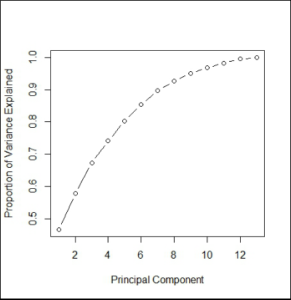
Concatenate Dependent Variable and Principal Components
We now concatenate the dependent variable i.e. ln_Price with principal components and take the first seven components for our analysis. First, we will concatenate the entire loadings dataset with the response aka y variable ln_Price and then subset the dataset for 7 PCs.
pca_train2 <- cbind(loadings,Y_train)
View(pca_train2)
Creating Dataset Having Principal Components
Above the output forms the complete train dataset. As now we will be performing linear regression on this dataset we are required to create a separate dataset having all the principal components i.e. the independent features.
loadings2 <- loadings[1:7]
pca_train2 <- cbind(loadings2,Y_train)
View(pca_train2)
Initializing and Fitting Linear Regression Model
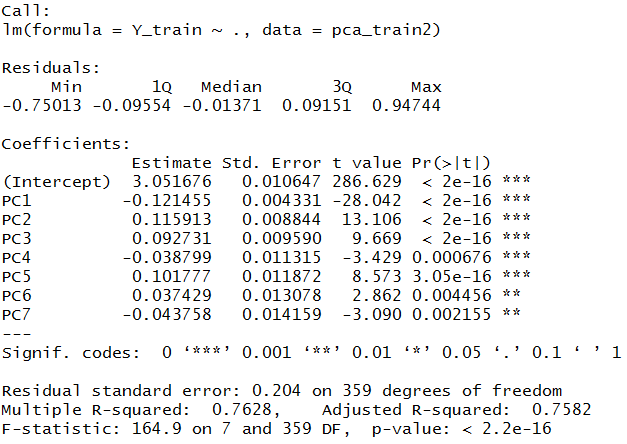
We use lm to initialize linear regression model
lin_model <- lm(Y_train~.,data=pca_train2)
summary(lin_model)
Transform Features of Test Dataset into Principal Components
As mentioned earlier, we will transform the features of the dataset into Principal Components using the PCA model created earlier.
pca_test <- test_set[1:13]
pca_test2 <- predict(pca, newdata = pca_test)
We now convert the above output into a dataset and add the dependent variable to it so that we can predict values using the above created linear regression.
pca_test2 <- as.data.frame(pca_test2)
View(pca_test2)
pca_test3 <- pca_test2[1:7]
Y_test <- test_set$ln_Price
pca_test4 <- cbind(pca_test3,Y_test)
Prediction
We now predict the dependent variable of the test dataset using the linear regression model created earlier.
predict1 <- predict(lin_model,pca_test3)
Results
We calculate the R-square to know the accuracy of our model.
error <- Y_test - predict1
mse <- mean(error^2)
R2=1-sum(error^2)/sum((Y_test- mean(Y_test))^2)
R2

Factor Analysis
Factor Analysis is a method which works in an unsupervised setup and forms groups of features by computing the relationship between the features. It is commonly used to reduce features and is explored in Factor Analysis under the theory section. We will now explore the application of Factor Analysis in R.
Factor analysis can only be used to reduce continuous variables of the dataset. Therefore, we will be removing categorical variables. Again, like principal component analysis, this is an unsupervised learning algorithm and hence we will be removing the dependent variable from our dataset.
Removing the Dependent and Categorical Variables
As mentioned above, factor analysis works in an unsupervised setup only for the numerical variables, therefore, we will get rid of the categorical and the dependent variable. We first assign the train dataset to Bos_train2 for use in the factor analysis steps.
Bos_train2 <- train_set
Factor1 = subset(Bos_train2,select = c(1,2,3,5,6,7,8,9,10,11,12,13))
View(Factor1)
Creating Correlation Matrix for the Above Dataset
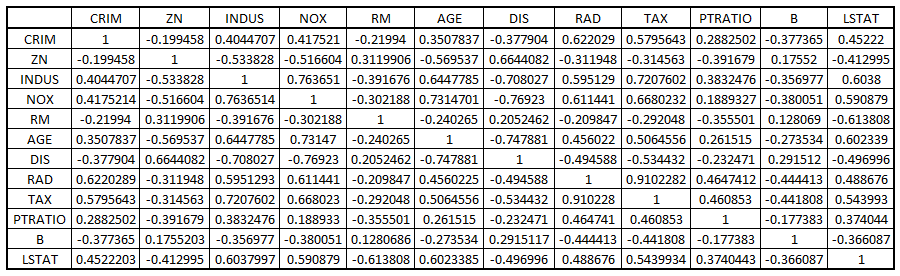
To perform factor analysis we first create a correlation matrix using the above dataset. We can also manually analyse this matrix as this will give us an idea of the variables that are highly correlated to each other.
corrm<- cor(Factor1)
Finding Eigen Values
We will now find the eigenvalues to decide the number of factors that will be sufficient for our modeling i.e. deciding the number of variables we will use during modeling.
eigen(corrm)$values

Coming up with other useful values such as cumulative eigenvalue, percentage variance and cumulative percentage variance.
library(dplyr)
eigen_values <- mutate(data.frame(eigen(corrm)$values)
,cum_sum_eigen=cumsum(eigen.corrm..values)
,pct_var=eigen.corrm..values/sum(eigen.corrm..values)
, cum_pct_var=cum_sum_eigen/sum(eigen.corrm..values))
write.csv(eigen_values,"C:/Users/user/Desktop/Data Sets/factor1.2.csv")
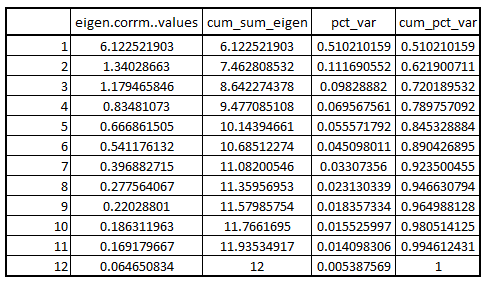
Clearly, the four factors explain approximately 79% of the variance. Therefore, the number of factors will be equal to 4 in our case.
Reducing Variable Using Factor Analysis
Using FA to perform factor analysis.
require(psych)
FA<-fa(r=corrm, 4, rotate="varimax", fm="ml")
FA_SORT<-fa.sort(FA)
FA_SORT$loadings
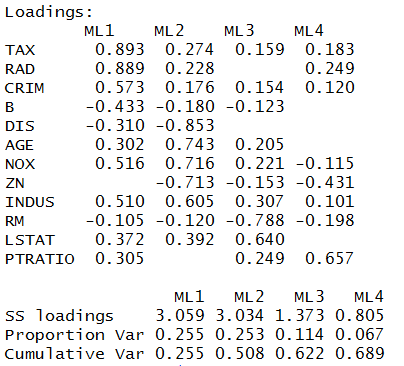
Grouping Variables
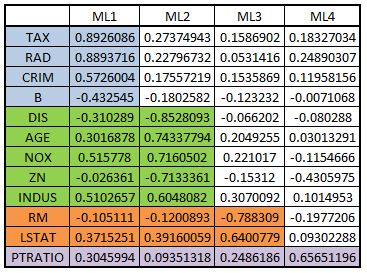
load1 = FA_SORT$loadings
write.csv(load1,"C:/Users/user/Desktop/Data Sets/factor1.3.csv")
Forming groups of variables from the output
There are many more algorithms such as decision trees which work in a supervised setup and can be used to reduce the dimensionality of the dataset. In unsupervised setup, PCA and factor analysis are the most commonly used models to reduce the dimensionality of the dataset. Both these methods have been put to use for reducing the dimensionality of the dataset using Python in the blog Dimensionality Reduction in Python.