 TM
TM// miscellaneous methods
Consolidation of Datasets
Among the first steps of preprocessing is to consolidate the datasets so that modeling can be done, as often the required data can be scattered in various datasets and needs to be consolidated. However before any such consolidation can be done, the variables need to be identified. The variable identification process first requires identifying the Predictor and the Target variable. Here the predictor variable is the Input and the target is the Output. For example, we have a dataset where the variables are the subject’s income, amount of pending debt, whether owns a house or not, whether is married or not and if the subject has been unable to repay the loan or not. Here the Target variable is whether the subject has been unable to repay the loan or not while others can be used as input or the predictor variables. The identification of the target variable is crucial in consolidating the datasets.
The datasets can be consolidated in many ways, here two methods will be discussed: Appending and Merging.
Appending Datasets
Appending is a method of consolidating datasets where the data from various datasets can be combined vertically. Appending is required generally when the same data is spread across various datasets. A typical scenario is when the data is stored in spreadsheets and as it has a very limited capacity to store, multiple spreadsheets may be there and their data is required to be appended or ‘concatenated’ so that any analysis can be done.
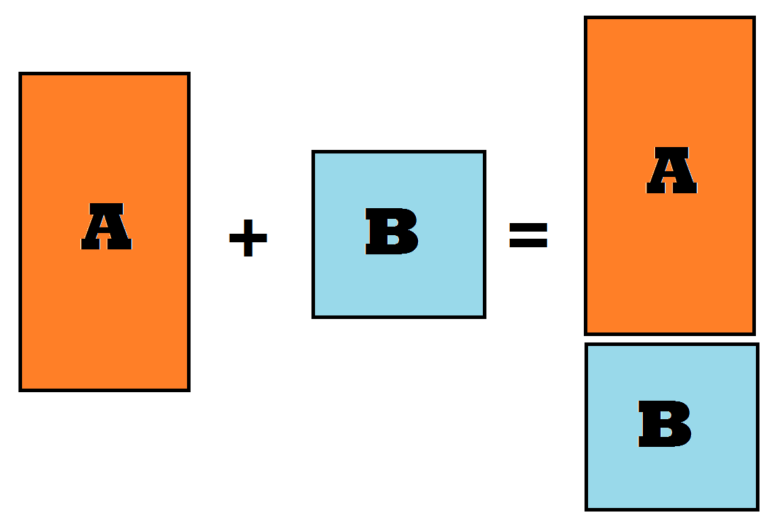
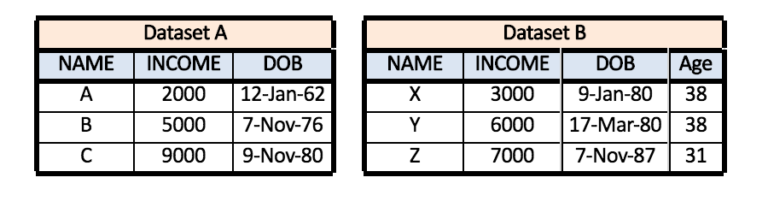
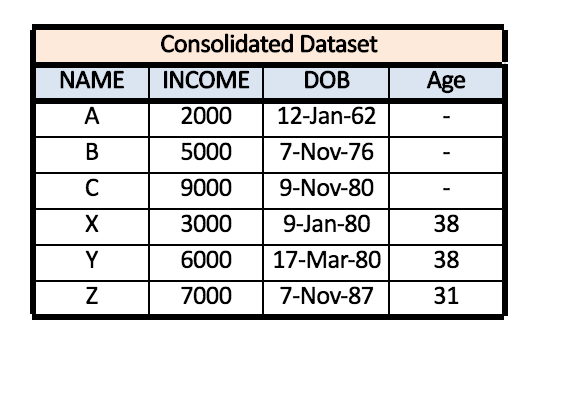
Appending highly relies on the name of the variables where the data from each variable is “stacked” on each other to create an appended dataset. One must be vigilant that in certain software, the appending process is case sensitive and if you have two datasets wherein dataset A there are three variables - ‘NAME’, ‘INCOME’, and ‘DOB’ - while in dataset B the three variables are - ‘Name’, ‘INCOME’, and ‘DOB’. In reality the name variable has the same information, however as the process is case sensitive, the data under the variable ‘Name’ in dataset B will not get stacked under the data of variable ‘NAME’ in dataset A.
Also, the appending process requires the columns to be same and if there is an extra variable in either of the datasets, the appending process may need to be ‘forced’.
Merging Datasets
Merging is a way of consolidating datasets where the datasets are combined horizontally. Here the variables are added to the existing observations, i.e. transferring columns from one dataset to another (unlike appending where rows are transferred), where the datasets are added to the side of one another.
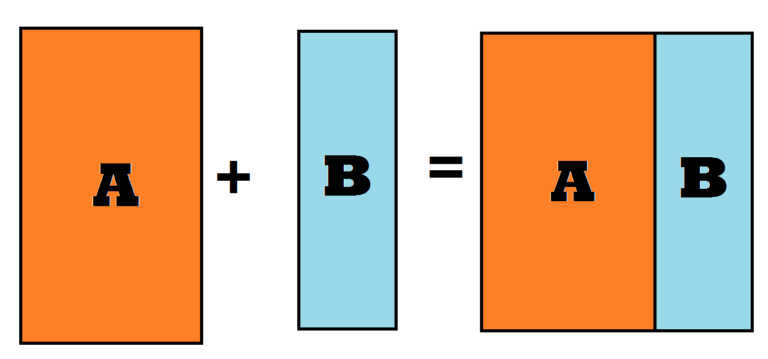
It is important to note that at least one common variable should be there in both the datasets and may be required to have the same name in both the datasets (this precondition depends on the software you are using); also, multiple common variables can be used during the merging process.
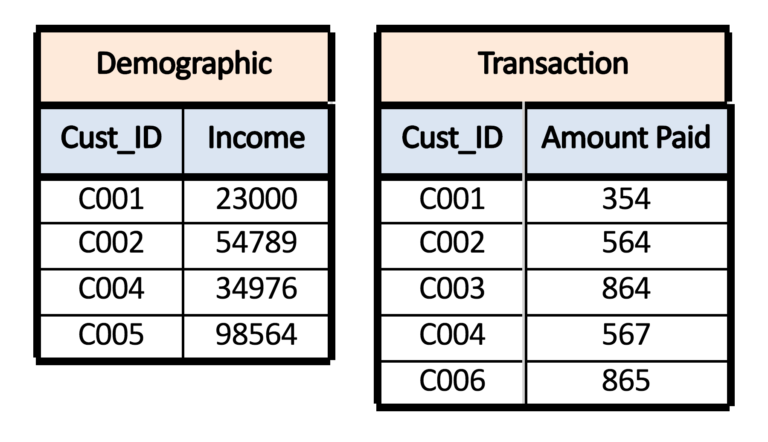
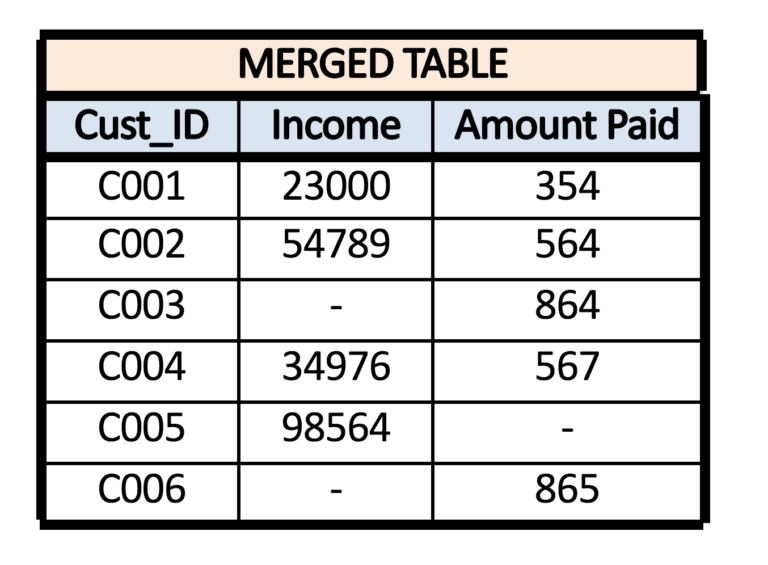
Typical scenarios where merging is required are, for example, when we have customers where the demographic details of the patients are available in one dataset while the transaction details are available in another. Here the common variable can be the customer name or the ‘Customer ID’, and by using this common variable, the two datasets can be joined / combined / merged into one, and this dataset can be used for further analysis and modelling.
To understand the merging process and outcomes, it is crucial to understand the different types of relationship that the two datasets can share. There are mainly three types of such relationships: One to One, One to Many, and Many to Many.
One to One Relationship
One to One Relationship between two datasets is formed when for each value of a common variable in the first dataset there is only one matching value for that common variable in the second dataset.
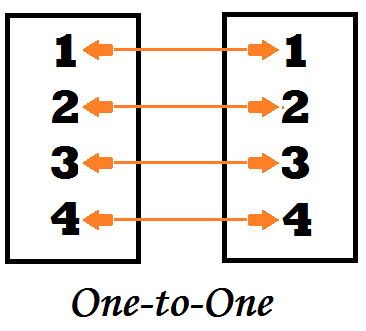
For example, if we have two datasets wherein dataset A - customer’s demographic detail is given - and in dataset B - there is transaction details of the customers - and we require to merge the datasets to have a complete dataset where the demographic and transaction details of each customer are provided. In this example, we can see that the two datasets share a one to one relationship.
One to Many Relationship
One to Many Relationship between two datasets is formed when for each value of a common variable in the first dataset there is more than one matching value for that common variable in the second dataset.
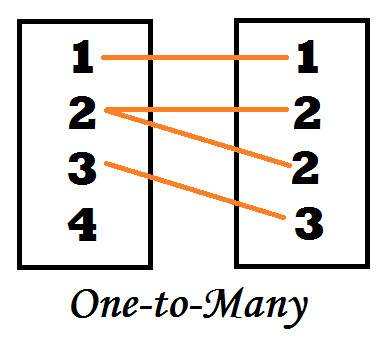
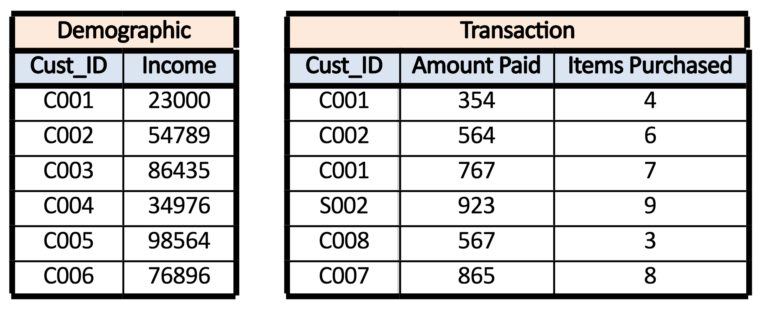
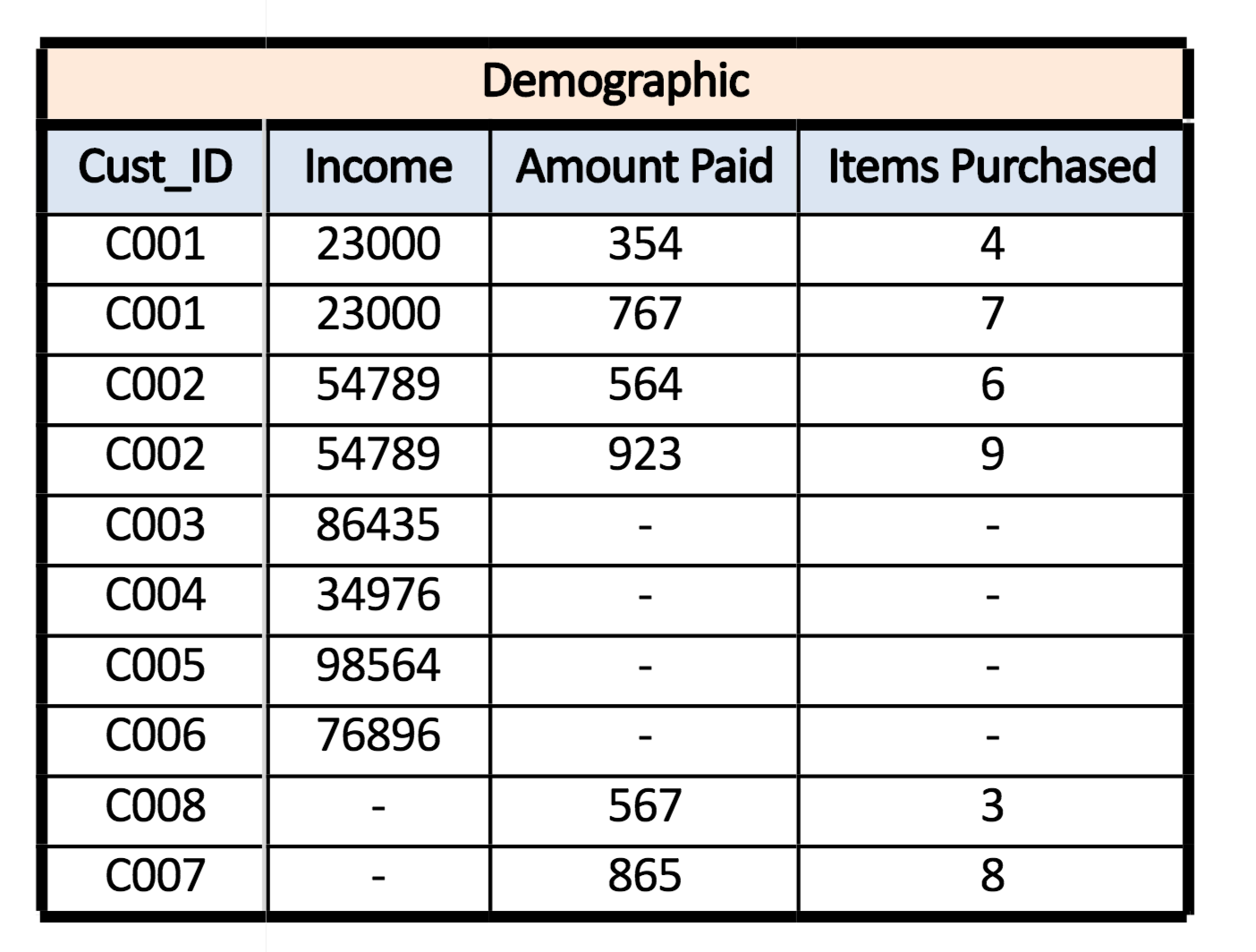
For example, if we have two datasets wherein dataset A - customer’s demographic detail is given where for each unique customer ID their income is available - while in dataset B - transaction details are given which include multiple amounts paid and number of items purchased for each unique customer ID - and we require to merge the datasets to have a complete dataset where the demographic and transaction details of each customer are provided. In this example, we can see that the two datasets share a one to many relationship.
Many to Many Relationship
In a many to many relationship, observations in each field (which are used to create a relationship between datasets) are included multiple times in each dataset, and we require to combine datasets horizontally where the output has all the combinations of the observations, i.e. the output is a cartesian product of rows. For example, if we have two tables with 3 and 2 records respectively, then using the Cartesian product, we have a table with 3 X 2 = 6 records.
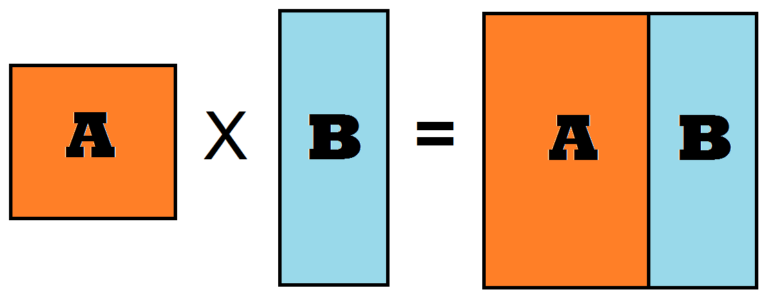
In the below example we can see what happens when two datasets are used to form a Cartesian product.
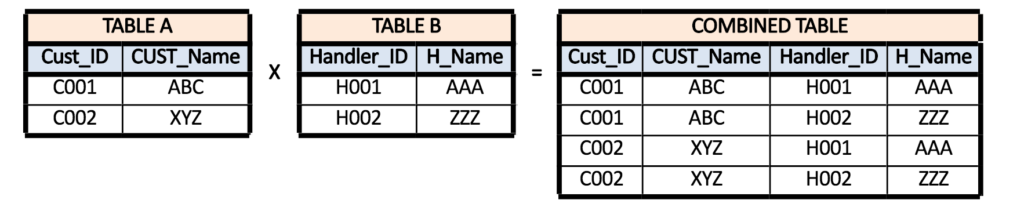
The problem with many-to-many relationship is that we get the cartesian product of rows, so we end up counting the same row more than once, causing duplications in the output dataset, which can result in incorrect results and may cost us computing resources such as space and processing speed etc.
Ways of Joining Tables
There are multiple ways to join a table, such as Inner Join, Left Join, Right Join, Full Join etc. We can understand all these different ways with the help of an example where we have two datasets: Dataset-A and Dataset-B. Now there are various ways of merging these two datasets.
Inner Join
Here only the common records from both the datasets are considered.
Left Join
All the observations that are present in Table-A, along with the observations that are common with Table-B, are considered. (A = 1, B = 0)
Right Join
All the observations that are present in Table-B, along with the observations that are common with Table-A, are considered. (A = 0, B = 1)
There are also outer joins that are sometimes used. There are four outer joins: Left Outer Join, Right Outer Join, Outer Join if Null, and Full Outer Join.
Left Outer Join
Only the observations unique to Dataset-A are considered. (A = 1)
Right Outer Join
Only the observations unique to Dataset-B are considered. (B = 1)
Outer Join (If Null)
Sometimes referred to simply as Outer Join, here only the unique observations are considered. (A = 0, B = 0)
Full Outer Join
Here all the observations from both datasets are considered. (A = 1, B = 1)
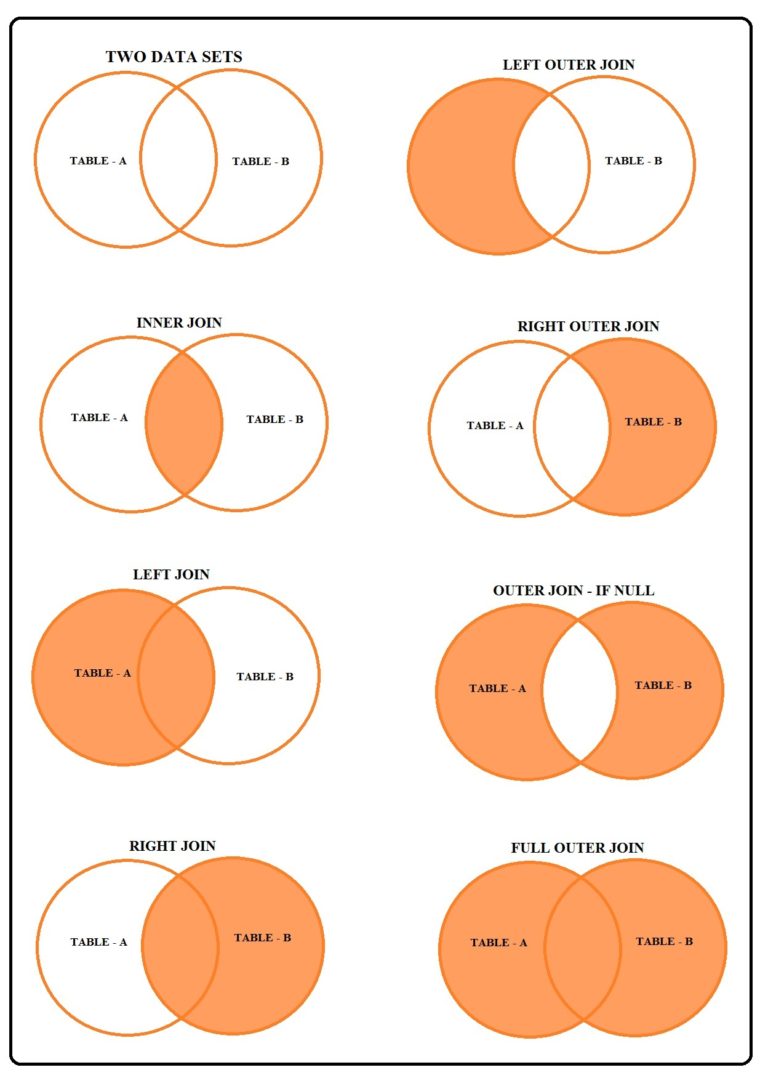
Thus in merging, on the basis of one variable, information is looked for in another dataset, and by doing so information is added - here an addition of variables takes place.
It is important to remember that observations can be overwritten; for example, during a Left Join, observations will be overwritten to table A if there is more than one common variable in both the datasets. Therefore no common variables should be there in both the datasets except the variable through which data is being merged.
Consolidation of datasets is a common step taken during the preparation phase. Here we explored two ways of consolidating datasets - Appending, where observations are added to an existing dataset (or a new dataset is created altogether), and Merging, where variables are added to the dataset. Both methods are equally important and are put to use depending on the situation at hand. Once the datasets are consolidated, other pre-processing steps such as Missing Value Treatment, Outlier Treatment, and various Feature Engineering steps can be taken to make the data cleaner and compatible for a learning algorithm.