 TM
TM// application · python
Model Evaluation in Python
Various model evaluation techniques help us to judge the performance of a model and also allow us to compare different models fitted on the same dataset. We not only evaluate the performance of the model on our train dataset but also our test/unseen dataset. In this blog, we will be discussing a range of methods that can be used to evaluate supervised learning models in Python. We will first start off by using evaluation techniques used for a Regression Models. Many of these methods have been explored under the theory section in Model Evaluation - Regression Models. We will then proceed with various evaluation techniques used for evaluating classification models which also have been explored under the theory section in Model Evaluation - Classification Models. In this blog, we will be evaluating a Linear Regression and a Logistic Regression Model.
Evaluating Regression Model
Importing Preliminary Libraries
We first import some preliminary libraries such as pandas, numpy etc.
import numpy as np
import pandas as pd
import matplotlib.pyplot as plt
%matplotlib inline
Importing Dataset
We will use a pre-processed Boston dataset.
BosData = pd.read_excel('C:/Users/user/Desktop/Data Sets/Linear Regression/BostonData_Updated.xlsx')
BosData.head()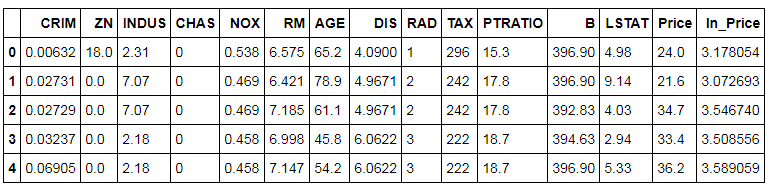
Splitting Dataset
We now split the dataset into train and test so that we can fit a linear regression model on the train dataset.
X = BosData[['CRIM', 'ZN', 'INDUS', 'CHAS', 'NOX', 'RM', 'AGE', 'DIS', 'RAD', 'TAX', 'PTRATIO', 'B', 'LSTAT']]
Y = BosData['ln_Price']

from sklearn.model_selection import train_test_split
X_train,X_test,Y_train,Y_test=train_test_split(X,Y,test_size=0.3,random_state=123)
Initialising and Fitting Model
We initialise a linear regression model and fit it on the Train dataset.
from sklearn import linear_model
linreg_model = linear_model.LinearRegression()
linreg_model.fit(X_train,Y_train)
Predicting on Test Dataset
We use the above-created model and predict the value of the dependent variable in the test dataset.
lin_test_pred = linreg_model.predict(X_test)
Import Metrics
As now we have the predicted values, we can use these values and compare them with the original values i.e. the values of the dependent variable of the test dataset. To do so, we import metrics from sklearn which allows us to perform a range of evaluation techniques to evaluate this regression model.
from sklearn import metrics
Sum of Squared Error (SSE)
It is one of the most simple for evaluating a regression model. However as of now, there is no inbuilt function to calculate SSE, therefore, we will calculate SSE by multiplying the number of observations by mean square error to get the value of SSE.
Y_test.shape
The shape command tells us the dimension of the test dataset and we use this value to calculate the SSE.
SSE = 152*(metrics.mean_squared_error(Y_test,lin_test_pred))
SSE
The SSE of this Linear Regression model comes out to be 6.73
Mean Squared Error (MSE)
We use the mean_squared_error command to calculate MSE in python.
metrics.mean_squared_error(Y_test,lin_test_pred)
The MSE for the above created Linear Regression model comes out to be 0.04
Root Mean Squared Error (RMSE)
Here we use numpy and metrics to calculate the RMSE.
np.sqrt(metrics.mean_squared_error(Y_test,lin_test_pred))
RMSE comes out to be 0.21
Mean Absolute Error (MAE)
Here metrics provide us with mean_absolute_error which allows us to easily calculate the MAE.
metrics.mean_absolute_error(Y_test,lin_test_pred)
The mean absolute error from this regression model comes out at 0.15
Coefficient of Determination (R²)
Among the most commonly used measure for evaluating regression models, Coefficient of Determination or R² can be easily calculated by using the metrics package.
metrics.r2_score(Y_test,lin_test_pred)
The R² for this Regression model comes out to be 0.71
Adjusted R²
Adjusted R-square is used to provide us with a more unbiased picture as it punished multicollinearity and gives a fair evaluation value. To calculate Adjusted R² we first calculate the variance of Y_test.
var_test = Y_test.var()
var_test
We use the above-calculated variance to compute Adjusted R-square.
mse = metrics.mean_squared_error(Y_test,lin_test_pred)
Adj_rsquare = 1-(mse/var_test)
Adj_rsquare
1 − MSE/var(Y_test) approximates R², not Adjusted R² - it applies no penalty for the number of predictors (K), which is why the value here (0.72) is even slightly higher than the R² of 0.72. A true Adjusted R² uses 1 − (1 − R²)·(n−1)/(n−K−1) and is always ≤ R². Treat the value above as an R² approximation.The adjusted R-square comes out to be 0.72
Analysis of Residuals
Residuals are the differences between the actual values and the predicted values. If we square these errors and sum them up then we get SSE (Residual Sum of Squares). A method to evaluate a model is by analyzing these error terms (residuals) by plotting them on a graph. Ideally, if the residuals appear to behave randomly and show no pattern then it means that the model is good.
plt.scatter(lin_test_pred,(Y_test-lin_test_pred),marker='^')
plt.xlabel("Fitted")
plt.ylabel("Residual")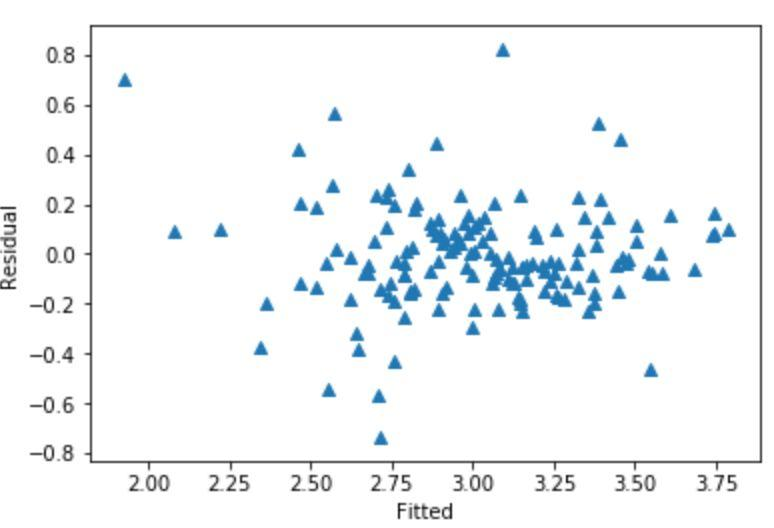
There is no pattern in the error terms which means that there is no non-linearity in the data. As the residuals appear to behave randomly and show no pattern, we can say that the model is good.
Evaluating Classification Model
Importing Dataset and Fit Logistic Regression Model
We use a pre-processed Titanic dataset to create a regularized logistic regression model and then fit it on the train dataset.
TitanicD1 = pd.read_excel('C:/Users/user/Desktop/Data Sets/Logistic Regression/TitanicData_Binary.xlsx')
scaled_final = pd.read_excel('C:/Users/user/Desktop/Data Sets/Logistic Regression/Titanic_Scaled.xlsx')
X1_train,X1_test,Y1_train,Y1_test=train_test_split(scaled_final,TitanicD1['Survived'],test_size=0.3,random_state=123)
from sklearn.linear_model import LogisticRegression
log_model = LogisticRegression()
log_model.fit(X1_train,Y1_train)Predicting on Test Dataset
We use the above-created logistic regression model and predict the value of the dependent variable in the test dataset.
pred_log = log_model.predict(X1_test)
Import Metrics
As now we have the predicted values, we can perform various evaluation technique. For evaluating classification models also we import metrics from sklearn which allows us to calculate various metrics.
from sklearn import metrics
Confusion Matrix
Confusion matrix is one of the most powerful and commonly used evaluation technique as it allows us to compute a whole lot of other metrics that allow us to evaluate the performance of a classification model.
Creating a simple confusion matrix:
cm = metrics.confusion_matrix(Y1_test,pred_log)
cm
![Confusion matrix as array: [[147, 23], [30, 68]]](/assets/mev-py-eval-cm-array.png)
We will now represent the Confusion Matrix using the heat map in the seaborn package.
import seaborn as sn
sn.heatmap(cm, annot=True, fmt='.2f', xticklabels = ["No", "Yes"], yticklabels = ["No", "Yes"])
plt.ylabel('True label',fontsize=12)
plt.xlabel('Predicted label',fontsize=12)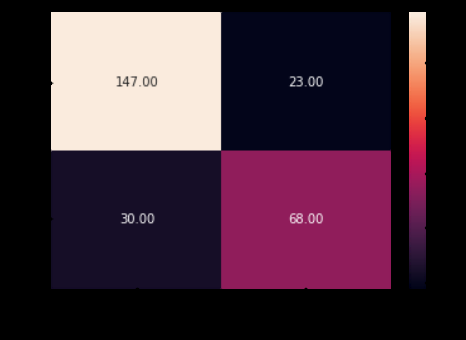
Various types of metrics can be calculated using the confusion matrix and in order to do so, we create a classification report.
print(metrics.classification_report(Y1_test,pred_log,digits=2))
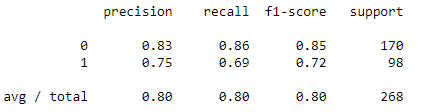
From the classification report, we are able to get precision and recall.
Accuracy Score
Accuracy Score can also be calculated using metrics.
metrics.accuracy_score(Y1_test,pred_log)
The accuracy score for the logistic regression model comes out to be 0.80
AUC and ROC
In logistic regression, the values are predicted on the basis of the probability of the dependent variable. For example, in the Titanic dataset, logistic regression computes the probability of the survival of the passengers. By default, it takes the cut off value equal to 0.5, i.e. any probability value greater than 0.5 will be accounted as 1 (survived) and any value less than 0.5 will be accounted as 0 (not survived).
In order to improve the accuracy of the model, we can change the value of this cut-off. The new value of cut off can be decided by using the ROC curve. To know more about AUC and ROC curve, refer to the Model Evaluation - Classification Models in the theory section
AUC
First we will predict the probability values from logistic regression model for our dataset.
predict_proba = pd.DataFrame(log_model.predict_proba(X1_test))
predict_proba.head()
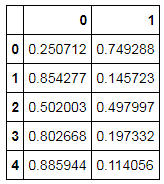
We will now make a dataset containing actual values of the Survived variable (dependent variable), predicted values and probabilities of survival. To do this, we first start with converting predicted values of survival to a data frame for merging datasets.
pred_log = pd.DataFrame(pred_log)
We now reset the index for Y1_test
Y1_test1 = Y1_test.reset_index()
We then concatenate datasets using pd.concat
predictions = pd.concat([Y1_test1,pred_log,predict_proba],axis = 1)
Finally, the columns of the dataset are renamed and we get the final table that allows us to calculate the AUC score and create ROC Curve.
predictions.columns = ['index', 'actual', 'predicted', 'Survived_0', 'Survived_1']
predictions.head()
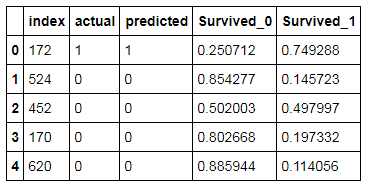
We use the above table to compute the AUC score i.e. the Area Under the Curve.
auc_score = metrics.roc_auc_score( predictions.actual, predictions.Survived_1)
round( float( auc_score ), 2 )
The AUC score comes out to be 0.86
ROC
We now calculate the False Positivity Rate, True Positivity Rate and Threshold and use them to plot the ROC curve (Receiver Operating Characteristic)
fpr, tpr, threshold = metrics.roc_curve(Y1_test,predictions.Survived_1)
roc_auc = metrics.auc(fpr, tpr)

plt.title('Receiver Operating Characteristic')
plt.plot(fpr, tpr, 'b', label='ROC curve (area = %0.2f)' % auc_score)
plt.legend(loc = 'lower right')
plt.plot([0, 1], [0, 1],'r--')
plt.xlim([0, 1])
plt.ylim([0, 1])
plt.ylabel('True Positive Rate')
plt.xlabel('False Positive Rate')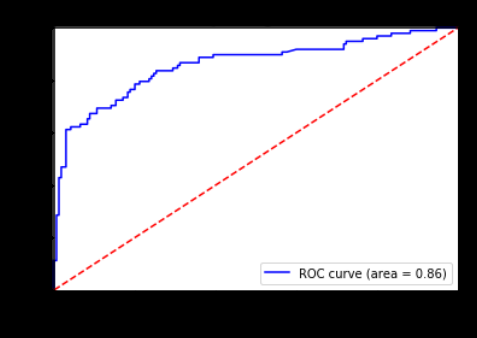
As we can notice, the minimum difference between the False Positive and True Positive is when our sensitivity value at 0.6. Now we will calculate the new cut off value based on this value of sensitivity and see how the accuracy of our model increases.
cutoff_prob = threshold[(np.abs(tpr - 0.6)).argmin()]
round( float( cutoff_prob ), 2 )
The ideal cutoff for having the maximum sensitivity (True Positive Rate) and 1-specificity (False Positive Rate) comes out to be 0.6
We will now predict the survival rate by using the new cut off value.
predictions['new_labels'] = predictions['Survived_1'].map( lambda x: 1 if x >= cutoff_prob else 0)
predictions.head()
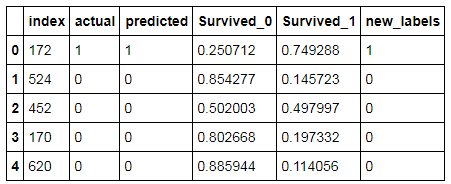
We create new Confusion Matrix with actual and new values.
cm1 = metrics.confusion_matrix( predictions.actual,
                          predictions.new_labels, [1,0] )
sn.heatmap(cm1, annot=True, fmt='.2f', xticklabels = ["No", "Yes"], yticklabels = ["No", "Yes"])
plt.ylabel('True label',fontsize=12)
plt.xlabel('Predicted label',fontsize=12)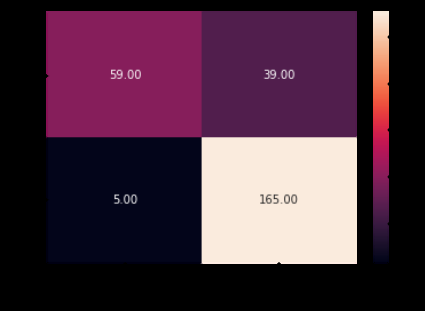
We also calculate the new Accuracy Score.
metrics.accuracy_score(predictions.actual,predictions.new_labels,[1,0])
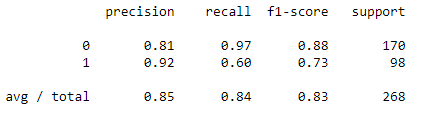
We notice a slight increase in our accuracy from roughly 0.802 to 0.835.
A new Classification report can be generated using the new outcome from the new cut-off value.
print(metrics.classification_report(predictions.actual,predictions.new_labels,digits=2))
KS, Gain and Lift Chart
As explored in the theory section, Kolmogorov-Smirnov, Gain and Lift chart can be very useful for evaluating a classification model. Here we will explore all the three methods to evaluate a logistic regression model.
Dataset
As the Titanic Dataset that we used so far don't have much data, therefore, it becomes tough to perform KS statistics or generate gain and lift charts. Therefore, to demonstrate the above mentioned methods we used a different dataset having a binary dependent variable: Defaulters and Non-Defaulters. We will be importing the dataset set where the probabilities of defaulters has already been predicted by using a logistic regression model.
Train_Data = pd.read_csv('C:/Users/user/Desktop/Data Sets/Logistic Regression/Credit_Default.csv')
Train_Data1 = Train_Data[['CHURN','Prob']]
Train_Data1.head()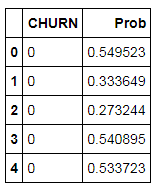
KS Chart
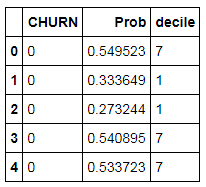
We first group the probabilities by quartiles and run the program to make 10 bins for the probabilities.
Train_Data1['decile'] = pd.qcut(Train_Data1['Prob'],10,labels=['1','2','3','4','5','6','7','8','9','10'])
Train_Data1.head()
We will now change the name of the variables for our understanding.
Train_Data1.columns = ['Defaulter','Probability','Decile']
Train_Data1.head()
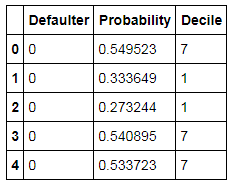
Non-Defaulters can be calculated by subtracting 1 from the column of Defaulters.
Train_Data1['Non-Defaulter'] = 1-Train_Data1['Defaulter']
Train_Data1.head()
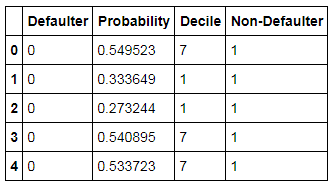
Now, we will make use of the pivot table to make the chart table to calculate KS statistics.
df1 = pd.pivot_table(data=Train_Data1,index=['Decile'],values=['Defaulter','Non-Defaulter','Probability'],
                     aggfunc={'Defaulter':[np.sum],
                              'Non-Defaulter':[np.sum],
                              'Probability' : [np.min,np.max]})
df1.head()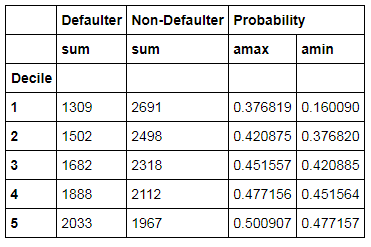
We use reset_index for a better understanding of the table.
df1.reset_index()
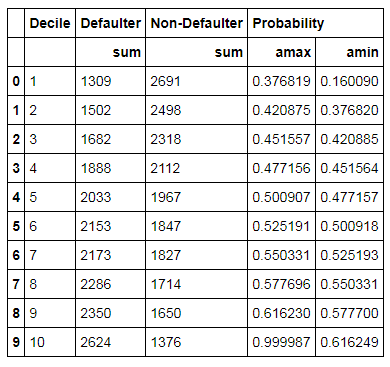
We rename the columns as per our requirement.
df1.columns = ['Defaulter_Count','Non-Defaulter_Count','max_score','min_score']
df1['Total_Cust'] = df1['Defaulter_Count']+df1['Non-Defaulter_Count']
df1
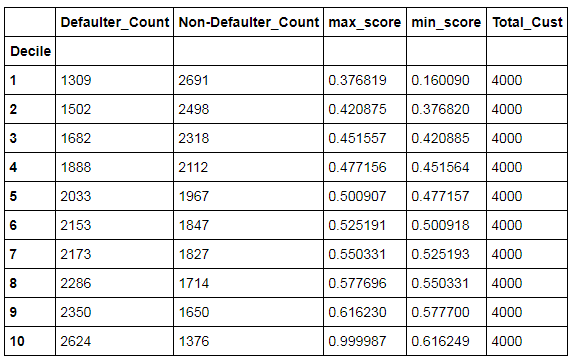
We Sort the min_score in descending order.
df2 = df1.sort_values(by='min_score',ascending=False)
df2
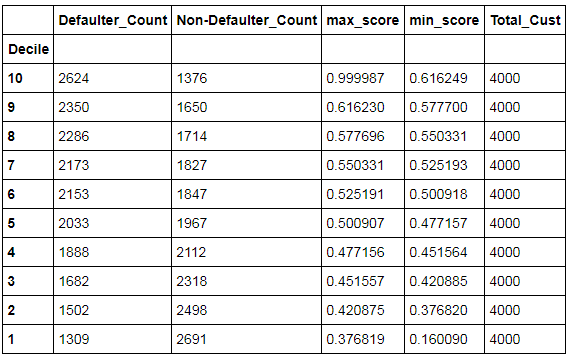
We now calculate the defaulters and non-defaulters rate per decile.
df2['Default_Rate'] = (df2['Defaulter_Count'] / df2['Total_Cust']).apply('{0:.2%}'.format)
default_sum = df2['Defaulter_Count'].sum()
non_default_sum = df2['Non-Defaulter_Count'].sum()
df2['Default %'] = (df2['Defaulter_Count']/default_sum).apply('{0:.2%}'.format)
df2['Non_Default %'] = (df2['Non-Defaulter_Count']/non_default_sum).apply('{0:.2%}'.format)
df2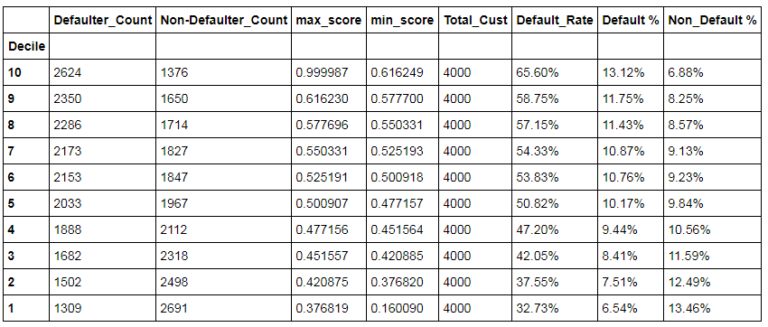
We finally calculate KS Statistics using the above values.
df2['ks_stats'] = np.round(((df2['Defaulter_Count'] / df2['Defaulter_Count'].sum()).cumsum() - (df2['Non-Defaulter_Count'] / df2['Non-Defaulter_Count'].sum()).cumsum()) * 100, 2)
df2
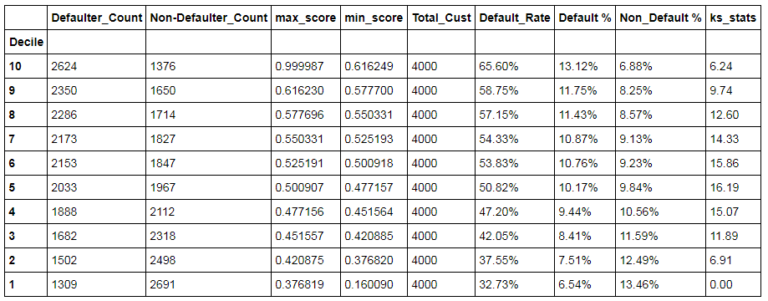
KS Statistics is the difference between the cumulative Defaulter and Non-Defaulter Rate.
We will now find the KS Statistics value which is the max of KS statistics scored for each decile.
flag = lambda x: '*****' if x == df2['ks_stats'].max() else ''
df2['max_ks'] = df2['ks_stats'].apply(flag)
df2
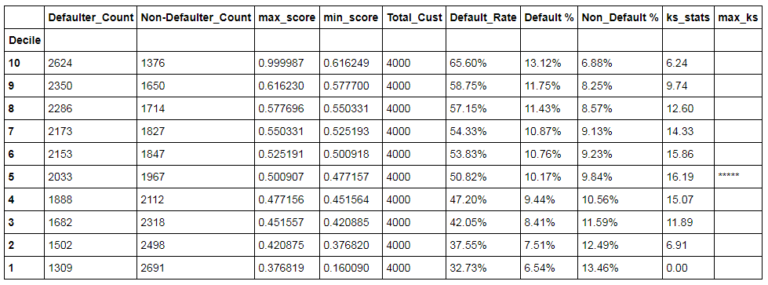
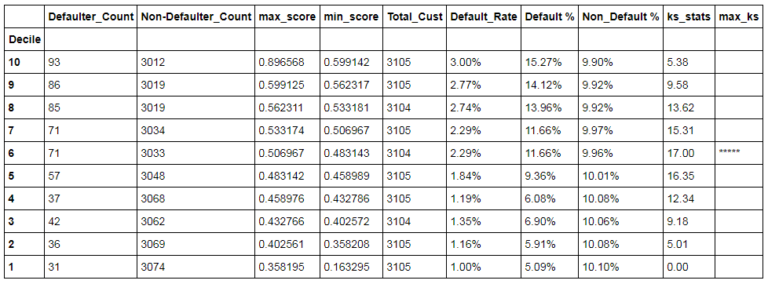
The same process shall be carried with the test data set and you will arrive on the following output.
flag = lambda x: '*****' if x == df_test['ks_stats'].max() else ''
df_test['max_ks'] = df_test['ks_stats'].apply(flag)
df_test
Gains Chart
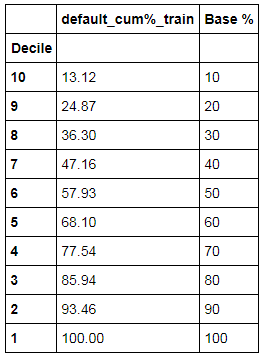
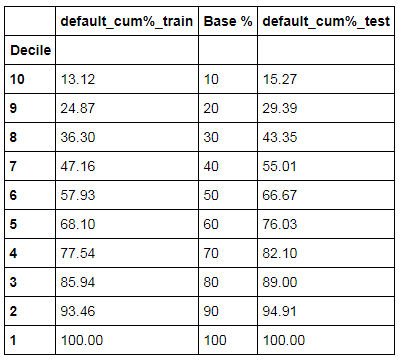
To plot the Gain Chart, we need to calculate the cumulative of defaulters percentage. This has to be calculated for both train and test datasets. Hence, we will make use of the output generated while computing KS statistic.
df_test1 = df_test.copy()
df_test1['default_cum%'] = np.round(((df_test['Defaulter_Count'] / df_test['Defaulter_Count'].sum()).cumsum() * 100), 2)
df_test1
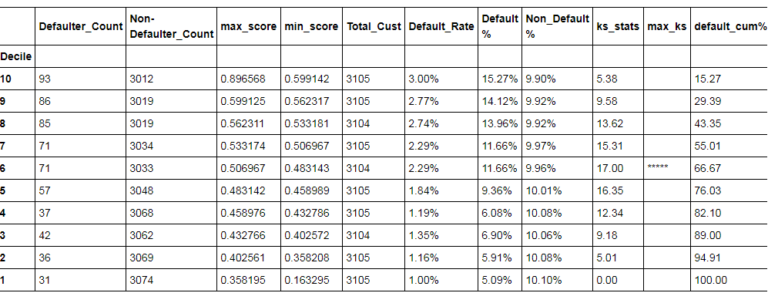
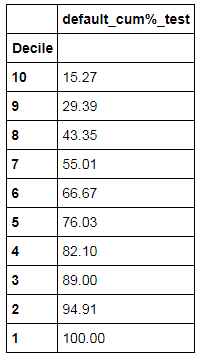
default_cum%_test column separately.
df_test2 = df_test1[['default_cum%']]
df_test2.reset_index()
df_test2.columns = ['default_cum%_test']
df_test2
Adding Base values in another column.
df3 = df2.copy()
df3['default_cum%'] = np.round(((df2['Defaulter_Count'] / df2['Defaulter_Count'].sum()).cumsum() * 100), 2)
df_train = df3[['default_cum%']]
df_train.reset_index()
df_train.columns = ['default_cum%_train']
df_train2 = df_train.copy()
df_train2['Base %'] = [10,20,30,40,50,60,70,80,90,100]
df_train2
Concatenating the above dataset with the default_cum%_train.
final = pd.concat([df_train2,df_test2],axis=1)
final
Creating a Gain chart using the above table.
gains_chart = final.plot(kind='line',use_index=False)
gains_chart.set_ylabel("Proportion of Defaulters",fontsize=12)
gains_chart.set_xlabel("Decile",fontsize=12)
gains_chart.set_title("Gains Chart")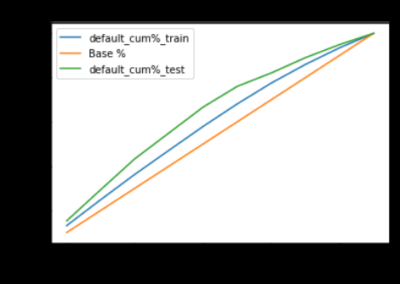
Lift Chart
We use the dataset created above and add lift_train and lift_test column to it along with 1 as the baseline.
final2 = final.copy()
final2['lift_train'] = (final['default_cum%_train']/final['Base %'])
final2['lift_test'] = (final['default_cum%_test']/final['Base %'])
final2['Baseline'] = [1,1,1,1,1,1,1,1,1,1]
final2
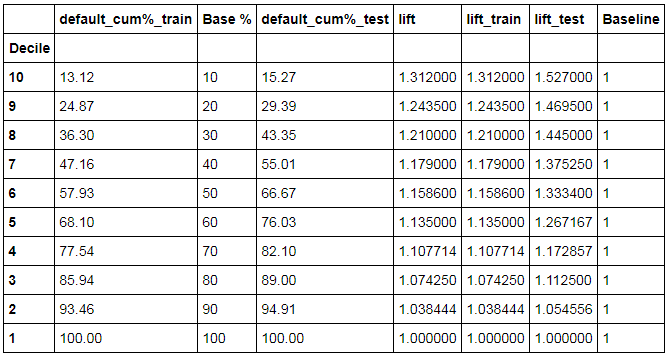
We just keep the columns that are required to create a lift chart.
lift_chart = final2[['lift_train','lift_test','Baseline']]
lift_chart
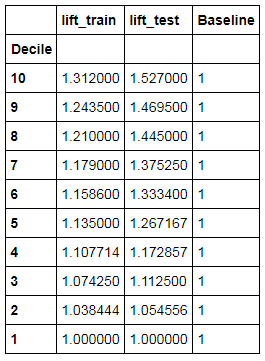
We now finally create a lift chart using the above table.
lift_chart1 = lift_chart.plot(kind='line',use_index=False)
lift_chart1.set_ylabel("lift",fontsize=12)
lift_chart1.set_xlabel("Decile",fontsize=12)
lift_chart1.set_title("Lift Chart")
lift_chart1.set_ylim(0.0,2)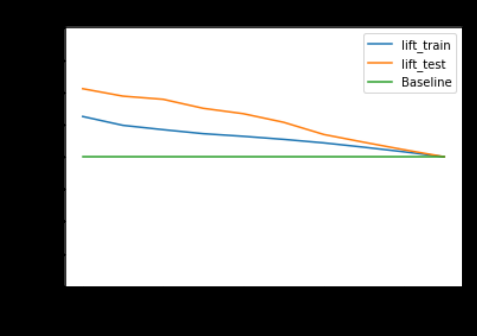
In this blog, we explored methods such as Sum of Squared Errors, Mean Squared Error, Coefficient of Determination etc that are very useful in evaluating Regression Models. On the other hand, for evaluating classification models methods such as Confusion Matrix along with charts such as KS, Gain and Lift Chart got used for evaluating a Logistic Regression Model. Similar methods have also been explored in R in the Model Evaluation using R.