 TM
TM// application · python
Model Validation in Python
Various model validation techniques can be used to find the best model and the best set of hyperparameters. We not only validate the performance of the model on our train dataset but also our test/unseen dataset. In this blog, we will be discussing a range of cross-validation methods that can be used to validate supervised learning models in Python. Many of these methods have been explored under the theory section in Model Validation. Here we will be using a pre-processed Boston dataset to demonstrate regression-based cross-validation techniques and a pre-processed Titanic dataset for classification-based cross-validation.
Preparation
Import of Preliminary Libraries
We first start off by adding some basic libraries.
import numpy as np
import pandas as pd
import matplotlib.pyplot as plt
%matplotlib inline
from sklearn.model_selection import train_test_split, StratifiedKFold
from sklearn import linear_model
from sklearn.linear_model import LogisticRegression
Dataset
As mentioned above, we will be using the pre-processed Boston dataset for applying all of the cross-validation techniques (except stratified cross-validation) that we have used earlier in the application part of the modeling section.
BosData = pd.read_excel('C:/Users/user/Desktop/Data Sets/Linear Regression/Bos_train1.xls')
BosData.head()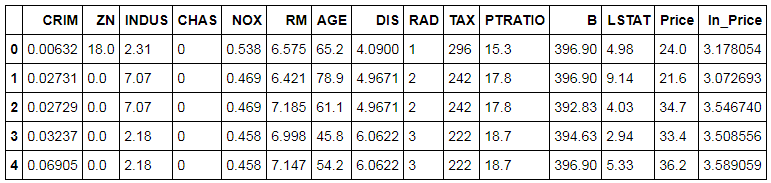
Now, we divide the dataset based on their variables. We create an X dataset which will have all the Independent Features while Y is a dataset with the dependent variable i.e. Target Variable (in this case it is 'ln_Price').
X = BosData[['CRIM', 'ZN', 'INDUS', 'CHAS', 'NOX', 'RM', 'AGE', 'DIS', 'RAD', 'TAX','PTRATIO', 'B', 'LSTAT']]
Y = BosData['ln_Price']
Validation for Finding Best Model
We will first use the different validation techniques to find the best models. Here we don't perform any hyperparameter tuning and simply see how the model is performing on the test dataset/s and based on the accuracy scores find the best model.
Holdout Cross-Validation
Rather than a simple or degenerate form of cross-validation, Holdout cross-validation is generally known as the 'simple validation' technique. Here we simply divide the dataset into two parts with the first part being the Train dataset where we fit the model and learn the function and the second being Test where the model is made to perform and is evaluated upon. Here we will run a Linear Regression algorithm on the Boston dataset and will use the holdout cross-validation technique.
Splitting Dataset
We first split the dataset into train and test. We take a 70:30 ratio keeping 70% of the data for training and 30% for testing.
X_train,X_test,Y_train,Y_test=train_test_split(X,Y,test_size=0.3,random_state=123)
Initializing Linear Regression Model
Here we initialize the Linear Regression model. Right now we are using no hyperparameters and simply use LinearRegression() to initialize.
linreg_model = linear_model.LinearRegression()
Fitting Model
We fit the Linear Regression model on the Train Dataset.
linreg_model.fit(X_train,Y_train)
Prediction
The Linear Regression model now used to predict the Y variable in the Test dataset.
pred_linmodel = linreg_model.predict(X_test)
Calculating Accuracy
We can now calculate the accuracy of the model. For doing so we first import metrics from sklearn and calculate the R² which tells us of the model's performance on the Test dataset.
from sklearn import metrics
metrics.r2_score(Y_test,pred_linmodel)
This model provides us with 71% Accuracy however as discussed in the theory section, holdout cross-validation can easily lead our model to overfit and thus more sophisticated methods such as k-fold cross validation must be used.
K-Fold Cross Validation
In this method, we repeatedly divide our dataset into train and test where we fit the model on train and run it on test and get the accuracy score and this way we are able to use all of the dataset and are able to use the same data points for training as well as for testing. In the end, we average all such scores and the final score becomes the accuracy of our model. In Python, we can perform K-Fold Cross-Validation using two libraries, one is cross_val_score while the other is KFold and both can be found in sklearn.model_selection.
cross_val_score
Importing cross_val_score: We first import the package cross_val_score from sklearn.model_selection to perform K-Fold Cross-Validation.
from sklearn.model_selection import cross_val_score
Initializing Linear Regression Model: We then initialise a simple Linear Regression model.
from sklearn import linear_model
lin_reg = linear_model.LinearRegression()
Running cross-validation: We now run K-Fold Cross Validation on the dataset using the above created Linear Regression model. Here we use 5 as the value of K.
lin_model_cv = cross_val_score(lin_reg,X,Y,cv=5)
Cross-Validation Scores: We compute the accuracy scores obtained from each of the 5 iterations performed during the 5-Fold Cross-Validation.
lin_model_cv
Final Score: As mentioned earlier, we average out all the cross-validation scores and come up with a single, final score which serves as the accuracy score of our model.
print("RSquare: %0.2f (+/- %0.2f)" % (lin_model_cv.mean(), lin_model_cv.std() * 2))We get a 60% accuracy when we use K-Fold Cross-Validation. Note that all the five iterations and consequently their average resulted in low R-square value, which is less than what we got when we used hold-out cross validation even when the modeling algorithms were exactly same in both the methods indicating that the K-Fold Cross-Validation is addressing the problem of over-fitting of our model and is providing us with the right picture by giving us the correct, more unbiased and real evaluation score of our model. Also, note that cross_val_score by default runs a K-Fold Cross-Validation when working with a Regression Model whereas it runs a Stratified K-Fold Cross-Validation when dealing with a Classification Model.
KFold
Importing KFold: Another method of performing K-Fold Cross-Validation is by using the library KFold found in sklearn.model_selection.
from sklearn.model_selection import KFold
Running KFold: We now run K-Fold Cross Validation on the dataset using the above Linear Regression model created earlier. Here also we will use 5 as the value of K. Here we declare the value of K in n_splits.
lin_model_kfold = KFold(n_splits=5)
Cross-Validation Scores: We compute the accuracy scores obtained from the 5 iterations.
cross_val_score(lin_reg, X, Y, cv=lin_model_kfold)
We get the exact same scores which we got when we used cross_val_score to run K-Fold Cross-Validation.
Shuffle Split K-Fold Cross-Validation
It is a variant of K-Fold Validation which randomly splits the data so that no observation is left while cross validating the dataset. Here you can specify the size of the test dataset and n_splits specify the number of times the process of splitting will take place.
Running Shuffle Split and Obtaining Scores: We use the Linear Regression model created earlier and perform a 5-Fold Cross-Validation using 30% of the dataset being the test size. We then calculate the accuracy scores found during each of the iterations.
from sklearn.model_selection import ShuffleSplit
lin_shuffle_split = ShuffleSplit(n_splits=5,test_size=0.3)
cross_val_score(lin_reg, X, Y, cv=lin_shuffle_split)
Repeated K-Fold Cross-Validation
It is used to run K-Fold multiple times, where it produces different split in each repetition.
Running Repeated K-Fold and Obtaining Scores: We use the Linear Regression model and perform a 5-Fold Cross-Validation with 5 repetitions for each fold and then calculate the accuracy scores for all the iterations.
from sklearn.model_selection import RepeatedKFold
lin_rkfold = RepeatedKFold(n_splits=5,n_repeats=5)
cross_val_score(lin_reg, X, Y, cv=lin_rkfold)
We notice from the output, that 25 iterations resulted in different levels of R-Square values. This is because we specified the number of split = 5 and number of times the process to be repeated equal to 5. Therefore, 5×5 equal to 25 iterations.
Leave-One-Out Cross-Validation (LOOCV)
In Leave-One-Out Cross-Validation, every observation in the dataset gets a turn as the test set. For each iteration, the model is trained on all remaining observations and tested on the single held-out one, which means the number of folds equals the number of rows in the dataset. In sklearn, LeaveOneOut from sklearn.model_selection handles this directly.
from sklearn.model_selection import LeaveOneOut
loo = LeaveOneOut()
loo_scores = cross_val_score(lin_reg, X, Y, cv=loo)
print("RSquare: %0.2f (+/- %0.2f)" % (loo_scores.mean(), loo_scores.std() * 2))LOOCV uses every data point for testing, which gives a thorough estimate of model performance. The trade-off is computation: with a large dataset, the number of model fits equals the number of rows, which gets expensive quickly.
Leave-P-Out Cross-Validation (LpOCV)
Leave-P-Out Cross-Validation is a generalisation of LOOCV where instead of holding out one observation at a time, P observations are held out as the test set in each iteration. All possible combinations of P observations from the dataset are used, making this even more exhaustive - and more computationally expensive - than LOOCV. In sklearn, LeavePOut from sklearn.model_selection is used.
from sklearn.model_selection import LeavePOut
lpo = LeavePOut(p=2)
lpo_scores = cross_val_score(lin_reg, X, Y, cv=lpo)
print("RSquare: %0.2f (+/- %0.2f)" % (lpo_scores.mean(), lpo_scores.std() * 2))With P=2, the number of splits grows combinatorially with dataset size. For most practical datasets, LpOCV is only feasible with small P values and small datasets.
Stratified K-Fold Cross-Validation
StratifiedKFold is only used for Classification models. This method of validation helps in balancing the class labels during the cross-validation process so that the mean response value is almost same in all the folds. To perform Stratified K-Fold Cross-Validation we will use the Titanic dataset and will use logistic regression as the learning algorithm.
Dataset: As this method only works for classification problems, we will import the pre-processed Titanic Dataset. Note that this dataset has been used in the previous section and its preprocessing can be found in the blog Classification Problems in Python.
TitanicD1 = pd.read_excel('C:/Users/user/Desktop/Data Sets/Logistic Regression/TitanicD1.xls')
Y_Titanic = TitanicD1['Survived']
scaled_final = pd.read_excel('C:/Users/user/Desktop/Data Sets/Logistic Regression/scaled_final.xls')
scaled_final.head()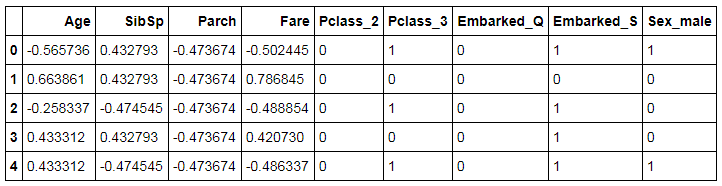
Initializing Logistic Regression Model: We now initialise the logistic regression model.
log_reg = LogisticRegression()
Performing Stratified K-Fold Cross-Validation: We perform a Stratified K-Fold Cross-Validation with the value of K being 5.
log_stratified = StratifiedKFold(n_splits=5)
log_stratified_score = cross_val_score(log_reg,scaled_final,Y_Titanic,cv=log_stratified)
Calculating Validation Scores: We now calculate the accuracy scores got from each cross-validation fold.
log_stratified_score
Final Score: We average out all the above scores to come up with a final evaluation score.
print("Accuracy Score: %0.2f (+/- %0.2f)" % (log_stratified_score.mean(), log_stratified_score.std() * 2))Validation for Finding Best Model and HyperParameters
We used K-Fold Cross Validation not only to find the best model but also to come up with the correct set of hyperparameters. Here we will tune the hyperparameters while we run K-Fold Cross-Validation.
K-Fold Cross-Validation with Grid Search
Here we will perform parameter estimation using grid search with cross-validation. To demonstrate Cross-Validation with Grid Search we will be using Random Forest Regressor as the learning algorithm and we will take the entire pre-processed Boston dataset for Grid Search Cross-Validation. Here, the data will be split into train and test using k-fold cross-validation, and hyperparameters will be tuned on the train dataset while the accuracy will be predicted on the test dataset.
Import GridSearchCV: We import GridSearchCV from sklearn.model_selection which allows us to tune hyperparameters.
from sklearn.model_selection import GridSearchCV
Importing RandomForestRegressor Library: We have to import RandomForestRegressor from sklearn.ensemble to run a Random Forest Regression model.
from sklearn.ensemble import RandomForestRegressor
Listing the parameters for GridSearchCV: Here we tune for 4 parameters: max_depth, max_features, min_samples_split and min_samples_leaf.
params_RF = {"max_depth": [3,5,6,7,8,9],
              "max_features":['auto', 'sqrt', 'log2'],
              "min_samples_split": [2, 3,5,7],
"min_samples_leaf": [1, 3,5,6]}max_features='auto' has been removed for RandomForest - use 'sqrt' (its old 'auto' behaviour), 'log2', or a float. The grids and best-parameter outputs are shown as originally run.Initializing and Fitting Model: We initialise the Random Forest model and then fit it on the dataset.
model_RF_GS = GridSearchCV(RandomForestRegressor(), param_grid=params_RF,cv=5)
model_RF_GS.fit(X,Y)
Best Parameter values for the model: We now use best_params_ to find the values of parameters selected during the above process.
model_RF_GS.best_params_
Predicting the values: We predict the values of the dependent variable. This will allow us to compute the accuracy score which here will be R-Square.
pred_rf_grid = model_RF_GS.predict(X)
Computing R-Square: We now compute the R-Square which helps us in evaluating the model.
from sklearn import metrics
metrics.r2_score(Y,pred_rf_grid)
We get 92% accuracy from the Random Forest Regressor. Note that this process resulted in very high accuracy. This may be due to the entire dataset getting leaked during the modeling process resulting in overfitting. Therefore, to avoid this problem we can use two methods: A combination of Holdout and K-Fold-Cross Validation or can perform Nested Cross-Validation.
K-Fold and Holdout Cross-Validation
A most common way of avoiding the model from getting overfit is by using a combination of K-Fold and Holdout Cross-Validation. So far we have used the entire dataset when using K-Fold Cross-Validation and this is indeed the biggest advantage of K-Fold that it allows the use of the entire dataset for learning the function and testing it. However, this can potentially lead to overfitting and to avoid it we compromise with this advantage of k-fold which allows us to use the whole of the dataset. Here we first use Holdout method to split the dataset into Train and Test. This Test dataset acts as an unseen data and is used to evaluate the model. We then use the Train dataset for K-fold Cross-Validation where this Train dataset is repeatedly split into Train and Test and the model gets trained and tested on all of this Train dataset. The model we acquire from this method is then used to predict the values of the unseen dataset i.e. the Test dataset obtained from the Holdout method and the accuracy score got from this model helps in giving us a better, unbiased picture of the performance of our model. This method can be used in any type of K-Fold Cross-Validation for either selecting the best model or for finding the best parameters or both.
Here we will perform the K-Fold Cross-Validation with Grid Search using the Random Forest as the learning algorithm as done above however this time we will fit the model on the Train dataset obtained from the Holdout Cross-Validation and evaluate its performance on the Test dataset (also got from Holdout Cross-Validation).
Splitting Data using Holdout Cross-Validation: We start from the scratch and first take the preprocessed Boston dataset and create two datasets with the X dataset having all the independent feature and Y dataset having the dependent variable. We then divide the dataset into Train and Test using Holdout method. Here the Test dataset will act as unseen data and it is 30% of the whole dataset.
X = BosData[['CRIM', 'ZN', 'INDUS', 'CHAS', 'NOX', 'RM', 'AGE', 'DIS', 'RAD', 'TAX','PTRATIO', 'B', 'LSTAT']]
Y = BosData['ln_Price']
X_train,X_test,Y_train,Y_test=train_test_split(X,Y,test_size=0.3,random_state=123)
Declaring Parameters: We now declare the hyperparameters that we need to tune.
params_RF = {"max_depth": [3,5,6,7,8,9],
              "max_features":['auto', 'sqrt', 'log2'],
              "min_samples_split": [2, 3,5,7],
              "min_samples_leaf": [1, 3,5,6]}
Initializing and Fitting Model: In this step, we initialize and build the Random Forest Regression model using GridSearchCV and fit it on the Train dataset rather than the whole dataset as done earlier.
rfr = RandomForestRegressor()
model_RF_GS = GridSearchCV(rfr, param_grid=params_RF)
model_RF_GS.fit(X_train,Y_train)
Best Parameters: We now check for the best combination of parameters.
model_RF_GS.best_params_
Predict and Check Accuracy: We use this model to predict the independent variable in the test data which we obtained during the holdout cross-validation dataset and check its accuracy.
pred_RF_GS = model_RF_GS.predict(X_test)
metrics.r2_score(Y_test,pred_RF_GS)
The accuracy comes out to be 79% which is less than we received earlier when we used the whole dataset however this might be because we are able to address the problem of overfitting now.
Nested Cross-Validation
In the blog, K-Fold Cross-Validation present under the theory section, Nested Cross-Validation have been explored. Nested Cross-Validation avoids the data getting leaked during the process of modeling. Here the dataset gets split into Train and Test for each iteration and within each of these iterations, the Train dataset gets further split into Train and Validation where the Hyperparameters are tuned in the Train and are evaluated on the Validation. This is known as the inner fold. The learning algorithm is then tested on the Test dataset and this forms the outer fold. In Python to perform Nested Cross-Validation, two K-Fold Cross-Validations are performed on the dataset i.e. inner cross-validation and outer cross-validation. The cross-validation performed with GridSearchCV is inner cross-validation while the cross-validation performed during the fitting of the best parameter model on the dataset is outer cv. As mentioned, the inner cv first divides the dataset into train and validation test and outer cv divides the dataset into train and test which can be said as an unseen data. This results in getting an unbiased accuracy of our model.
Here we will follow the similar steps as mentioned above in K-Fold Cross-Validation with Grid Search and will use the model obtained from it to perform outer cross-validation.
Inner Fold: We first perform K-Fold for tuning Hyperparameters.
params_RF = {"max_depth": [3,5,6,7,8,9],
              "max_features":['auto', 'sqrt', 'log2'],
              "min_samples_split": [2, 3,5,7],
              "min_samples_leaf": [1, 3,5,6]}

model_RF_GS = GridSearchCV(RandomForestRegressor(), param_grid=params_RF,cv=5)
model_RF_GS.fit(X,Y)
Outer Fold: We now perform K-Fold Cross Validation on the above-created model.
nested_RF_score = cross_val_score(model_RF_GS, X=X, y=Y, cv=5)
Cross-Validation Scores: We compute the accuracy scores obtained from each of the 5 outer folds.
nested_RF_score
Final Score: We now average out all the cross-validation scores and come up with a single, final score.
print("RSquare: %0.2f (+/- %0.2f)" % (nested_RF_score.mean(), nested_RF_score.std() * 2))We get a 62% accuracy when we use Nested K-Fold Cross-Validation. Such a low accuracy score might be because the model is not overfitting now and this is how the model will perform when is used on an unseen dataset.
In this blog post, we found how the accuracy score can change dramatically upon changing the cross-validation technique. This indicates that the problem of overfitting is ubiquitous and can be highly detrimental if it is not properly addressed. To save our model from overfitting and for getting an unbiased picture of our model's performance various cross-validation techniques can be used. While the various k-fold cross-validation methods are good at addressing the problem of overfitting, they are computationally expensive and can cause problems especially when the dataset is large enough. On the other hand, holdout method is simple and is useful especially when dealing with large datasets but can lead the model to overfit. Thus it becomes important to choose the right model validation technique. All such cross-validation methods are also explored in R in Model Validation in R.