 TM
TM// application · r
Model Evaluation in R
Various model evaluation techniques help us to judge the performance of a model and also allows us to compare different models fitted on the same dataset. We not only evaluate the performance of the model on our train dataset but also our test/unseen dataset. In this blog, we will be discussing a range of methods that can be used to evaluate supervised learning models in R. We will first start off by using evaluation techniques used for a Regression Models. Many of these methods have been explored under the theory section in Model Evaluation - Regression Models. We will then proceed with various evaluation techniques used for evaluating classification models which also have been explored under the theory section in Model Evaluation - Classification Models. In this blog, we will be evaluating a Linear Regression and a Logistic Regression Model.
Evaluating Regression Model
Importing Preliminary Libraries
We first import some preliminary libraries such as readxl and caTools.
library(readxl)
library(caTools)
Importing Dataset
We will use a pre-processed Boston dataset.
BosData = read_excel('C:/Users/user/Desktop/Data Sets/Linear Regression/BostonData_Updated.xlsx')
BosData <- subset(BosData,select = c(2,3,4,5,6,7,8,9,10,11,12,13,14,15))
View(BosData)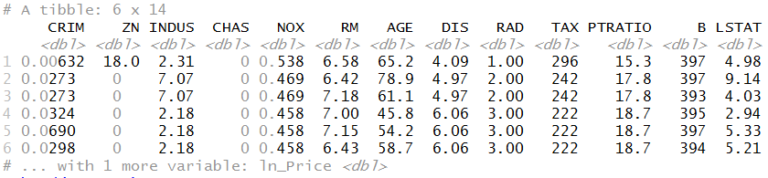
Splitting Dataset
We now split the dataset into train and test so that we can fit a linear regression model on the train dataset.
split <- sample.split(BosData$ln_Price,SplitRatio = 0.70)
train_set<- subset(BosData,split==T)
test_set<- subset(BosData,split==F)
Initializing and Fitting Model
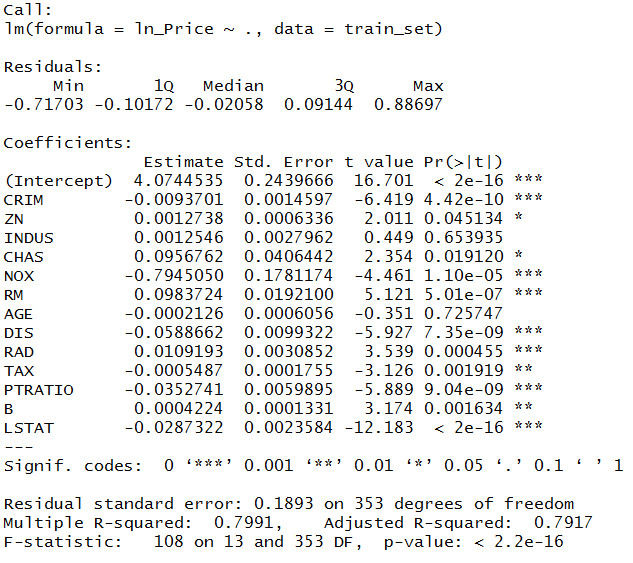
We initialize a linear regression model and fit it on the Train dataset.
lin_reg <- lm(ln_Price~.,data = train_set)
summary(lin_reg)
Predicting on Test Dataset
We use the above-created model and predict the value of the dependent variable in the test dataset.
pred_linreg <- predict(lin_reg,test_set[1:13])
Import Metrics
As now we have the predicted values, we can use these values and compare them with the original values i.e. the values of the dependent variable of the test dataset. To do so, we install and load the package Metrics which allows us to perform a range of evaluation techniques to evaluate this regression model.
install.packages("Metrics")
library(Metrics)
Sum of Squared Error (SSE)
It is one of the most simple for evaluating a regression model. We will use the sse function of Metrics package and apply it on the test dataset.
sum_squared_error <- sse(test_set$ln_Price,pred_linreg)
sum_squared_error
Mean Squared Error (MSE)
We use the mse command to calculate MSE in R.
mean_squared_error <- mse(test_set$ln_Price,pred_linreg)
mean_squared_error
Root Mean Squared Error (RMSE)
We use the rmse command to calculate RMSE in R.
root_mean_squared_error <- rmse(test_set$ln_Price,pred_linreg)
root_mean_squared_error
Relative Squared Error
Here we use rse function to compute relative squared error in R.
relative_squared_error <- rse(test_set$ln_Price,pred_linreg)
relative_squared_error
Mean Absolute Error
For Mean absolute Error calculation, we use mae function.
mean_abs_error <- mae(test_set$ln_Price,pred_linreg)
mean_abs_error
Mean Absolute Deviation
Here we divide mean absolute error by the number of observations of test dataset.
mean_abs_deviation <- mean_abs_error/139
mean_abs_deviation
mdae(test_set$ln_Price, pred_linreg) (median absolute error). The ≈0.001 shown here is MAE/n and isn't meaningful as MAD.Relative Absolute Error
We use rae function to calculate relative absolute error.
relative_abs_error <- rae(test_set$ln_Price,pred_linreg)
relative_abs_error
Coefficient of Determination (R²)
Among the most commonly used measure for evaluating regression models, and it can be calculated by the following code.
Y_test<- test_set$ln_Price
error <- Y_test - pred_linreg
R2=1-sum(error^2)/sum((Y_test- mean(Y_test))^2)
R2
Adjusted R²
Adjusted R-square is used to provide us with a more unbiased picture as it punished multicollinearity and gives a fair evaluation value.
Adj_R2 <- 1-(mean_squared_error/var(Y_test))
Adj_R2
1 − MSE/var(Y_test) approximates R², not Adjusted R² (no K penalty) - hence 0.7501 sits slightly above the R² of 0.7483, which a real Adjusted R² cannot. Use 1 − (1 − R²)·(n−1)/(n−K−1).Evaluating Classification Model
Importing Dataset and Fit Logistic Regression Model
We use a pre-processed Titanic dataset to create a regularized logistic regression model and then fit it on the train dataset.
library(readxl)
TitanicFinal <- read_excel("C:/Users/user/Desktop/Data Sets/Titanic/TitanicFinal.xlsx")
library(caTools)
set.seed(123)
split1 <- sample.split(TitanicFinal$Survived,SplitRatio = 0.70)
train_set1<- subset(TitanicFinal,split1==T)
test_set1<- subset(TitanicFinal,split1==F)
X1 <- as.matrix(train_set1[,-1])
Y1 <- as.matrix(train_set1[,1])
library(glmnet)
ridge_model<- glmnet(X1,Y1,family = "binomial",alpha = 0)
lambda_R <- min(ridge_model$lambda)
lambda_RPredicting on Test Dataset
We use the above-created logistic regression model and predict the value of the dependent variable in the test dataset.
X2 <- as.matrix(test_set1[,-1])
pred_ridge = predict(ridge_model,newx = X2,type = "response",s=lambda_R)
pred_ridge1 = ifelse(pred_ridge> 0.5,1,0)
Import caret
As now we have the predicted values, we can perform various evaluation techniques. For evaluating classification models we import caret package to compute confusion matrix.
library(caret)
Confusion Matrix
Confusion matrix is one of the most powerful and commonly used evaluation technique as it allows us to compute a whole lot of other metrics that allow us to evaluate the performance of a classification model.
Creating a simple confusion matrix:
confusionMatrix(pred_ridge1,reference = test_set1$Survived)
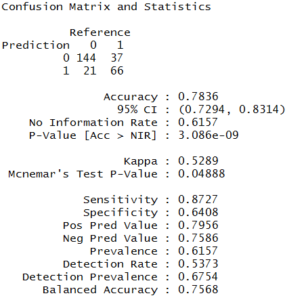
The above command gives us the accuracy score as well which is 79% in this case. However, another way to compute accuracy in R is by using the Metrics package.
Accuracy <- accuracy(test_set1$Survived,pred_ridge1)
Accuracy
AUC and ROC
In logistic regression, the values are predicted on the basis of the probability of the dependent variable. For example, in the Titanic dataset, logistic regression computes the probability of the survival of the passengers. In our above model, we took the cut off the probability as 0.5 i.e. any probability value greater than 0.5 will be accounted as 1 (survived) and any value less than 0.5 will be accounted as 0 (not survived).
In order to improve the accuracy of the model, we can change the value of this cut-off. The new value of cut off can be decided by using the ROC curve. To know more about AUC and ROC curve, refer to the Model Evaluation - Classification Models in the theory section.
AUC
Calculating AUC Score.
AUC <- Metrics::auc(test_set1$Survived,pred_ridge1)
AUC
ROC
We now calculate the False Positivity Rate, True Positivity Rate and Threshold and use them to plot the ROC curve (Receiver Operating Characteristic).
library(ROCR)
prediction <- prediction(predictions = pred_ridge,labels = test_set1$Survived)
perf <- performance(prediction,"tpr","fpr")
plot(perf,lwd=2,col='blue',main="ROC Curve")
abline(a=0, b= 1)
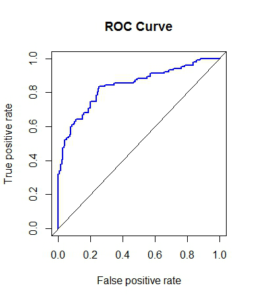
As we can notice, the minimum difference between the False Positive and True Positive is when our sensitivity value is more than 0.6. Now we will calculate the new cut off value based on this value of sensitivity and see how the accuracy of our model increases.
We will now find the cut off value using the performance function and cost measure. Cost measures the misclassification costs and gives the optimal cut off for minimum cost.
cost_perf = performance(prediction, "cost")
prediction@cutoffs[[1]][which.min(cost_perf@y.values[[1]])]
We will now predict the survival rate using this new cut off value.
pred_ridge2 <- ifelse(pred_ridge > 0.5561472,1,0)
Accuracy2 <- accuracy(test_set1$Survived,pred_ridge2)
Accuracy2
We notice a slight increase in our accuracy from roughly 78.3% to 79.4%.
KS, Gain and Lift Chart
As explored in the theory section, Kolmogorov-Smirnov, Gain and Lift chart can be very useful for evaluating a classification model. Here we will explore all the three methods to evaluate a logistic regression model.
Dataset
As the Titanic Dataset that we used so far don't have much data, therefore, it becomes tough to perform KS statistics or generate gain and lift charts. Therefore, to demonstrate the above-mentioned methods we used a different dataset having a binary dependent variable: Defaulters and Non-Defaulters. We will be importing the dataset set where the probabilities of defaulters has already been predicted by using a logistic regression model.
Train_Data = read.csv('C:/Users/user/Desktop/Data Sets/Logistic Regression/Credit_Default.csv')
View(Train_Data)
Train_Data1 = subset(Train_Data,select = c(23,80))
View(Train_Data1)
KS Chart
We first group the probabilities by quartiles and run the program to make 10 bins for the probabilities.
decLocations <- quantile(Train_Data1$Prob, probs = seq(0.1,0.9,by=0.1))
Train_Data1$decile <- findInterval(Train_Data1$Prob,c(-Inf,decLocations, Inf))
We will now make the table for our data to calculate KS Statistics and to do so we first will use group_by command of dplyr package to aggregate the data by decile.
library(dplyr)
decile_grp<-group_by(Train_Data1,decile)
decile_summ_train<-summarize(decile_grp, total_cnt=n(), min_prob=min(Prob), max_prob=max(Prob),
+                              default_cnt=sum(CHURN),
+                              non_default_cnt=total_cnt -default_cnt,
+                                     default_rate=(default_cnt/total_cnt)*100)

decile_summ_train<-arrange(decile_summ_train, desc(decile))
sum1 <- sum(decile_summ_train$default_cnt)
sum1
We also calculate for the non-default.
sum2 <- sum(decile_summ_train$non_default_cnt)
sum2
We now come up with the final table that will allow us to come up with other charts.
decile_summ_train$default_pct <- ((decile_summ_train$default_cnt)/sum1)*100
decile_summ_train$non_default_pct <- ((decile_summ_train$non_default_cnt)/sum2)*100
decile_summ_train$cum_default_pct <- cumsum(decile_summ_train$default_pct)
decile_summ_train$cum_non_default_pct <- cumsum(decile_summ_train$non_default_pct)
decile_summ_train$ks_stats <- abs(decile_summ_train$cum_default_pct-decile_summ_train$cum_non_default_pct)
View(decile_summ_train)
write.csv(decile_summ_train,"C:/Users/user/Desktop/Data Sets/Logistic Regression/decile_summ_train.csv")
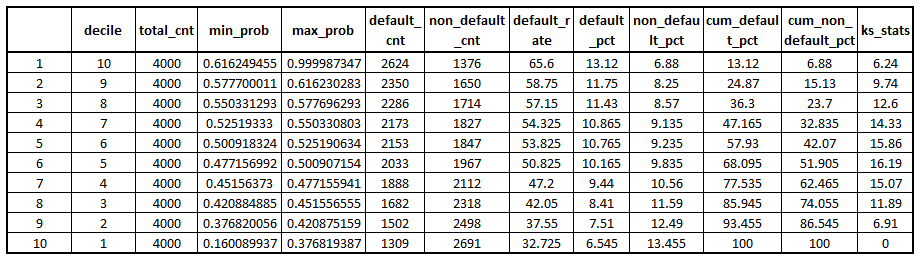
(Similar steps are followed for the test dataset and we go on to make the table for gains chart.)
Gains Chart
To plot the Gain Chart, we need to calculate the cumulative of defaulters percentage. This has to be calculated for both train and test datasets. Hence, we will make use of the output generated while computing KS statistic.
We first separate the decile and default_pct columns from the KS dataset for train and test dataset.
df_gain_train <- subset(decile_summ_train,select = c(1,10))
We rename the columns to differentiate between the default percentage of train and test dataset.
df_gain_train <- rename(df_gain_train,'cum_default_pct_train'='cum_default_pct')
df_gain_test <- subset(decile_summ_test,select = c(10))
df_gain_test <- rename(df_gain_test,'cum_default_pct_test'='cum_default_pct')
df_gain_chart <- cbind(df_gain_train,df_gain_test)
df_gain_chart <- cbind(df_gain_train,df_gain_test)
df_gain_chart$cum_default_pct_train <- round(df_gain_chart$cum_default_pct_train,2)
df_gain_chart$cum_default_pct_test <- round(df_gain_chart$cum_default_pct_test,2)
Adding Base values in another column.
base_pct <- c(10,20,30,40,50,60,70,80,90,100)
df_gain_chart <- cbind(df_gain_chart,base_pct)
We now create a Gain chart using the above table. We will be making use of the plotly package to create line graphs for multiple x columns and one y column.
library(plotly)
plot_ly(df_gain_chart,x=~decile,y=~cum_default_pct_train,type = 'scatter',name = 'train_pct', mode = 'lines') %>%
add_trace(y = ~cum_default_pct_test, name = 'test_pct', mode = 'lines') %>%
add_trace(y = ~base_pct, name = 'base_pct', mode = 'lines')%>%
layout(title = "Gains Chart",
xaxis = list(title = "Decile",range=c(1,10)),
yaxis = list (title = "Percenatge"))
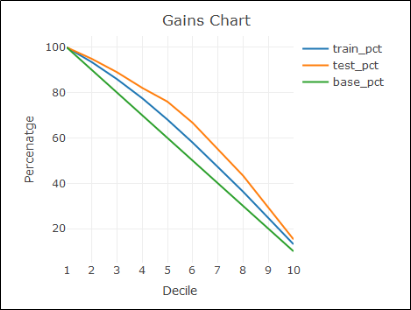
Lift Chart
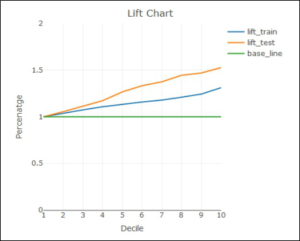
We use the dataset created above and add lift_train and lift_test column to it along with 1 as the baseline.
df_gain_chart$lift_train <-df_gain_chart$cum_default_pct_train/df_gain_chart$base_pct
df_gain_chart$lift_test <-df_gain_chart$cum_default_pct_test/df_gain_chart$base_pct
df_gain_chart$base_line <- c(1,1,1,1,1,1,1,1,1,1)
We just keep the columns that are required to create a lift chart.
lift_chart <- subset(df_gain_chart,select = c(1,5,6,7))
We now finally create a lift chart using the above table.
plot_ly(lift_chart,x=~decile,y=~lift_train,type = 'scatter',name = 'lift_train', mode = 'lines') %>%
add_trace(y = ~lift_test, name = 'lift_test', mode = 'lines') %>%
add_trace(y = ~base_line, name = 'base_line', mode = 'lines')%>%
layout(title = "Lift Chart",
xaxis = list(title = "Decile",range=c(1,10)),
yaxis = list (title = "Percenatge",range=c(0,2)))
Concordance
As there is no inbuilt function to compute concordance in R therefore, we create this function in our global environment of R and use it to compute concordance for our model.
Concordance = function(GLM.binomial) {
  outcome_and_fitted_col = cbind(GLM.binomial$y, GLM.binomial$fitted.values)
  # get a subset of outcomes where the event actually happened
  ones = outcome_and_fitted_col[outcome_and_fitted_col[,1] == 1,]
  # get a subset of outcomes where the event didn't actually happen
  zeros = outcome_and_fitted_col[outcome_and_fitted_col[,1] == 0,]
  # Equate the length of the event and non-event tables
  if (length(ones[,1])>length(zeros[,1])) {ones = ones[1:length(zeros[,1]),]}
  else {zeros = zeros[1:length(ones[,1]),]}
  # Following will be c(ones_outcome, ones_fitted, zeros_outcome, zeros_fitted)
  ones_and_zeros = data.frame(ones, zeros)
  # initiate columns to store concordant, discordant, and tie pairs
  conc = rep(NA, length(ones_and_zeros[,1]))
  disc = rep(NA, length(ones_and_zeros[,1]))
  ties = rep(NA, length(ones_and_zeros[,1]))
  for (i in 1:length(ones_and_zeros[,1])) {
    # This tests for concordance
    if (ones_and_zeros[i,2] > ones_and_zeros[i,4])
    {conc[i] = 1
      disc[i] = 0
      ties[i] = 0}
    # This tests for a tie
    else if (ones_and_zeros[i,2] == ones_and_zeros[i,4])
    {
       conc[i] = 0
       disc[i] = 0
       ties[i] = 1
    }
    # This should catch discordant pairs.
    else if (ones_and_zeros[i,2] < ones_and_zeros[i,4])
    {
       conc[i] = 0
       disc[i] = 1
       ties[i] = 0
    }
  }
  # Here we save the various rates
  conc_rate = mean(conc, na.rm=TRUE)
  disc_rate = mean(disc, na.rm=TRUE)
  tie_rate = mean(ties, na.rm=TRUE)
  Somers_D<-conc_rate - disc_rate
  gamma<- (conc_rate - disc_rate)/(conc_rate + disc_rate)
  #k_tau_a<-2*(sum(conc)-sum(disc))/(N*(N-1)
  return(list(concordance=conc_rate, num_concordant=sum(conc), discordance=disc_rate,
               num_discordant=sum(disc), ties_rate=tie_rate, num_tied=sum(ties),
               somers_D=Somers_D, Gamma=gamma))

}

#Concordance(m4)
Computing concordance of our model.
glm_model <- glm(Survived~.,data = as.data.frame(train_set1),family = binomial(logit))
Concordance(glm_model)
In this blog, we explored methods such as Sum of Squared Errors, Mean Squared Error, Coefficient of Determination etc that are very useful in evaluating Regression Models. On the other hand, for evaluating classification models methods such as Confusion Matrix along with charts such as KS, Gain and Lift Chart got used for evaluating a Logistic Regression Model. Similar methods have also been explored in Python in the Model Evaluation using Python.