 TM
TMRegression Problems in R
In the Theory Section of Modeling, various regression algorithms are explored. In this blog post, all those algorithms will be put to use using R.
Importing Libraries and Preparing Dataset
We will be using the inbuilt Boston Dataset for running the various Supervised Regression modeling algorithms. The dependent variable here is the price of a house and our objective will be to predict the price of the houses on the basis of the independent variable.
Note that before using the dataset for creating regression models we need to perform some steps of pre-processing.
Importing Libraries
Libraries for downloading dataset and for other operations.
library(MASS)
library(dplyr)
library(e1071)
Importing caTools library for splitting the dataset.
library(caTools)
Importing Dataset
The Boston dataset will be used for creating all the regression models.
library(MASS)
BosData<- Boston
View(BosData)
Renaming Column
Renaming column of medv in the dataset as Price.
BosData1 <- rename(BosData,'Price'='medv')
View(BosData1)
Checking for Skewness
We check how the dependent variable is distributed. We first create a histogram of the distribution of the 'Price' variable.
hist(BosData1$Price,col = 'dodgerblue3')
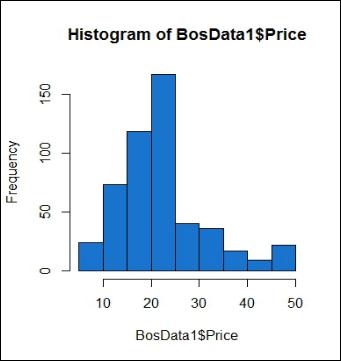
The distribution seems to be skewed.
For more certainty, we use the skewness command to measure the exact skewness.
skewness(BosData1$Price,type = 2)
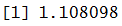
As the data is positively skewed, we will try transformation to reduce this skewness. We perform log transformation on the dependent variable.
BosData1['ln_Price'] <- log(BosData1$Price)
A Histogram can be created to check the distribution of the log-transformed dependent variable.
hist(BosData1$ln_Price,col = 'dodgerblue3')
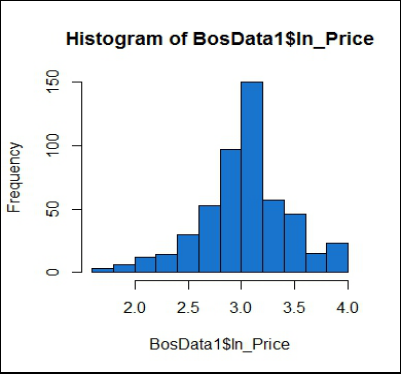
We now check for the measure of skewness in the 'ln_Price' variable.
skewness(BosData1$ln_Price,type = 2)

We decided to proceed with the log-transformed variable as it reduces the skewness of the dependent variable.
Train and Test Split
We will now be splitting our dataset into train and test using the split function. First, we will remove the price variable from the dataset, as we will be considering the ln_Price variable.
BosData2 = BosData1[,-c(14)]
split <- sample.split(BosData2$ln_Price,SplitRatio = 0.70)
train_set<- subset(BosData2,split==T)
test_set<- subset(BosData2,split==F)
The Process of Creating Regression Models
In a typical case, we follow the following steps for creating a regression model -
Step 1: Import packages required to run the particular model
Step 2: Fit the model on the Train dataset
Step 3: Predict the values on the Test dataset
Step 4: Compute the Accuracy score for the model
We also perform tuning of the hyperparameters, which is done to improve the accuracy of our model and save it from overfitting. There are mainly three ways to tune these parameters - Grid Search, Random Search, and Bayesian Optimization.
In this blog, we will be tuning our parameters using the first two methods and see how the accuracy score gets affected by it. We will be using Grid Search/Random Search that fit the best model i.e. model with best parameter values, on the train dataset and predict the value on the test dataset.
In grid search cross-validation, all combinations of parameters are searched to find the best model. The cross-validation command in the code follows k-fold cross-validation process. Here our dataset is divided into train, validation and test set. After finding the best parameter values using Grid Search for the model, we predict the dependent on the test dataset i.e. a kind of unseen dataset. Cross-validation helps in avoiding the problem of overfitting of the model. Please refer to Model Validation Techniques under the Theory Section for a better understanding of the concept. The concept of Hyper-Parameter tuning with cross-validation is discussed in Model Validation in Python under the Application Section.
In this blog, we will perform grid search and random search by mentioning the number of folds required for cross-validation. We will be doing 3 fold cross validation for hyperparameter tuning as the same has been done in Python (default method). Note that Random search has the same code as grid search and only the search parameter is set to grid/random as per the requirement. Also, the parameters are defined the same as we did in Python, i.e. values of hyperparameters are defined in a range.
Regression Algorithms
In the Theory Section of Regression Problems, a lot of Regression algorithms have been explored and in this blog post, we will create models using those algorithms to predict the price of the houses. We will be creating regression models using the following methods/algorithms - Linear Regression, Regularized Linear Regression, Decision Tree Regressor, KNN, Bagging Regressor (Ensemble), Random Forest Regressor (Ensemble), AdaBoosting Regressor (Ensemble), Gradient Boosting Regressor (Ensemble), Xgboost Regressor (Ensemble), and Stacking (Ensemble).
Linear Regression
To understand how Linear Regression works, refer to the blog on Linear Regression in the Theory Section. In this blog post, we will use Linear Regression algorithm to predict the price of the houses.
Initializing and Fitting Linear Regression Model
Here we initialize the Linear Regression model and fit it on the train dataset.
lin_reg <- lm(ln_Price~.,data = train_set)
Prediction
The Linear Regression model is used to predict the Y variable in the Test dataset.
pred_lin<- predict(lin_reg,test_set[1:13])
Calculating Accuracy
We also calculate the accuracy of the model by calculating the R² which tells us of the model's performance on the Test dataset. Note that this procedure will be followed for checking the accuracy of all the upcoming regression models' performance.
Y_test<- test_set$ln_Price
error_lin <- Y_test - pred_lin
R2_lin =1-sum(error_lin^2)/sum((Y_test-mean(Y_test))^2)
R2_lin
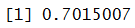
This model provides us with 70% Accuracy. Note that this is still not a very reliable measure and we need to compute many more metrics to evaluate the model's performance which has been explored in Model Validation in R.
Regularized Linear Regression
Regularized Linear Regression is of two types - Ridge and Lasso. Refer to Regularized Regression Algorithms under the Theory Section to understand the difference between the two. A third type is Elastic Net Regularization which is a combination of both penalties l1 and l2 (Lasso and Ridge). The package glmnet can be used to perform all these types of regularized linear regression.
Standardize the Dataset
We will have to first scale the data as Regularized Regression penalizes the coefficients and hence we cannot have the variables with different scales of measurement. Various models of regression require scaling of data, such as - Regularized Linear Regression (Lasso and Ridge), KNN, SVM and ANN. (We will be using the same scaled dataset for KNN also to predict the house prices.) As only continuous independent variables are to be considered for scaling the variables we first isolate them.
First, we separate out the dataset containing continuous variables.
BosData_scale =subset(BosData1,select = c(1,2,3,5,6,7,8,9,10,11,12,13))
We now apply scaling on the numerical features and convert it to a data frame.
BosData_scale1 = as.data.frame(scale(BosData_scale))
In this step, we concatenate the scaled variables with the leftover dataset (categorical variables and Y variable).
BosData_othvar =subset(BosData1,select = c(4,14))
BosData_final = cbind(BosData_scale1,BosData_othvar)
Splitting Dataset into Train and Test
Here we split the dataset into Train and Test.
set.seed(123)
library(caTools)
split1 <- sample.split(BosData_final$ln_Price,SplitRatio = 0.70)
train_set1<- subset(BosData_final,split1==T)
test_set1<- subset(BosData_final,split1==F)
Note that the above datasets will be used again when we will be dealing with KNN.
Lasso
Importing Library for Regularized Regression
We import glmnet library to conduct regularized regression.
library(glmnet)
Initialize and Fit Model
We build a Lasso Linear Regression Model which uses an l1 penalty i.e. alpha = 1 and fit it on the Train dataset.
X1_train<- as.matrix(train_set1[,-14])
Y1_train<- as.matrix(train_set1[,14])
reg_lasso_model<- glmnet(X1_train,Y1_train,alpha = 1)
Prediction and Calculate Accuracy
In this step, we predict the dependent variable of the test dataset and calculate its R².
lambda_L<- min(reg_lasso_model$lambda)
lambda_L

Calculating R-Square.
X1_test<- as.matrix(test_set1[,-14])
pred_lasso <- predict(reg_lasso_model,newx = X1_test,s=lambda_L)
Y_test1 <- test_set1$ln_Price
error_lasso <- Y_test1 - pred_lasso
# Actual R-square
R2_lasso =1-sum(error_lasso^2)/sum((Y_test1-mean(Y_test1))^2)
R2_lasso
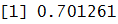
The accuracy of this model comes out to be at 70%.
Ridge
Building and Fitting Model
We build the Ridge Regression model and fit it on the Train dataset.
reg_ridge_model<- glmnet(X1_train,Y1_train,alpha = 0)
Prediction and Calculate Accuracy
In this step, we predict the dependent variable of the test dataset and calculate its R².
lambda_R<- min(reg_ridge_model$lambda)
lambda_R

Calculating R-Square.
pred_ridge <- predict(reg_ridge_model,newx = X1_test,s=lambda_R)
error_ridge <- Y_test1 - pred_ridge
# Actual R-square
R2_ridge =1-sum(error_ridge^2)/sum((Y_test1-mean(Y_test1))^2)
R2_ridge
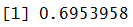
The accuracy of this model comes out to be at 69%.
Elastic Net
Elastic Net is the combination of Lasso and Ridge, therefore, we will take the value of alpha between 0 and 1.
Initialize and Fit the Model
In this step, we consider alpha = 0.01 and fit the model.
reg_enet_model<- glmnet(X1_train,Y1_train,alpha = 0.01)
Prediction and Calculate Accuracy
In this step, we predict the dependent variable of the test dataset and calculate its R².
lambda_E<- min(reg_enet_model$lambda)
lambda_E

Calculating Accuracy.
pred_enet <- predict(reg_enet_model,newx = X1_test,s=lambda_E)
error_enet <- Y_test1 - pred_enet
# Actual R-square
R2_enet =1-sum(error_enet^2)/sum((Y_test1-mean(Y_test1))^2)
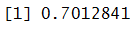
R2_enet
Tuning of Parameters
We will now tune the parameters for Regularized Linear Regression using Grid Search and Random Search. As discussed above, these methods will run the model with various parameters and will provide us with the best parameter. Here we will look for the best value of lambda and upon finding it we will fit the model on the Train dataset and will predict the values on test dataset and calculate the accuracy score using metrics package. For Elastic net, we will tune alpha also now as the value of alpha should be between 0 and 1 for elastic net.
Grid Search
Ridge
Import caret Library. We import caret which we will use to tune hyper-parameters.
library(caret)
Defining Parameters. Parameters have to be defined first and only then they can be used in the Grid Search. But before we define the parameters we will first define the control function, which will tell the program to run cross validation with grid search.
control <- trainControl(method = "cv",number = 3,search = "grid")
params_ridge <- expand.grid(alpha=1,lambda=c(1,0.1,0.01,0.02,0))
Building and Fitting Model. We now build the Regularized Linear Regression model using the Grid Search and fit it on the Train dataset.
lasso_gridsearch <- train(ln_Price~.,data = train_set1,method =
"glmnet",family="gaussian", trControl = control,tuneGrid=params_ridge)
Best Parameters. bestTune attribute can be used to find the best parameters.
lasso_gridsearch$bestTune
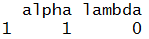
Prediction. We predict the House Prices on the Test dataset.
pred_lassoGS <- predict(lasso_gridsearch,newdata = test_set1[,-14])
Calculate Accuracy. We now compute the accuracy of this model.
error_lassoGS <- Y_test1 - pred_lassoGS
# Actual R-square
R2_lassoGS =1-sum(error_lassoGS^2)/sum((Y_test1-mean(Y_test1))^2)
R2_lassoGS
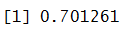
The accuracy comes out to be at 70%. Note - Here we have used Lasso Regression. You can perform the same steps mentioned above for hyperparameter tuning of a Ridge Regression Model by taking the value of alpha = 0.
Elastic Net
Defining Parameters. For Elastic Net Regression Model, we will tune two parameters: alpha and lambda.
params_enet <- expand.grid(alpha=c(0.1,0.01,0.001,0.2),lambda=c(1,0.1,0.01,0.02,0))
Building and Fitting Model. We now build the model using the Grid Search and fit it on the Train dataset.
enet_gridsearch <- train(ln_Price~.,data = train_set1,method = "glmnet",
family="gaussian", trControl = control,tuneGrid=params_enet)
Best Parameters. bestTune attribute can be used to find the best parameters.
enet_gridsearch$bestTune
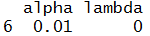
Prediction. We now predict using this model on the Test dataset.
pred_enetGS <- predict(enet_gridsearch,newdata = test_set1[,-14])
Calculate Accuracy. We compute the accuracy of this Elastic Net Regression model.
error_enetGS <- Y_test1 - pred_enetGS
# Actual R-square
R2_enetGS =1-sum(error_enetGS^2)/sum((Y_test1-mean(Y_test1))^2)
R2_enetGS

Decision Tree Regressor
Decision Trees allow us to come up with flowcharts that are structured as trees and allows us to predict the value of the dependent variable. Its inner workings have been explained in Decision Trees under the Theory Section.
This algorithm does not require scaled data, therefore we will use the same train and test dataset components as used in the Linear Regression model. As discussed in the theory blog of Decision Trees, this algorithm uses flowcharts that are structured as trees to predict the value of the class variable.
Importing Libraries
We import rpart which allows us to create a Decision Tree Regression model.
library(rpart)
Initializing and Fitting Decision Trees Model
Here we initialize the Decision tree model. Right now we are using no hyperparameters and simply use rpart to initialize. We then fit this model on the Train Dataset. We will use method="anova" for regression model.
DTR <- rpart(ln_Price~.,data =train_set,method = "anova")
Prediction and Calculating Accuracy
The Decision Tree model is used to predict the Y variable in the Test dataset. We also check the accuracy of this model on the Test dataset.
pred_DTR<- predict(DTR,newdata = test_set[,-14])
error_DTR<- Y_test - pred_DTR
R2_DTR=1-sum(error_DTR^2)/sum((Y_test-mean(Y_test))^2)
R2_DTR
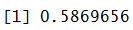
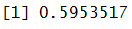
The accuracy of this Decision Tree model comes out to be at 59%.
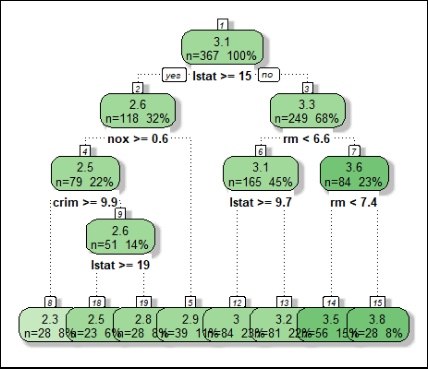
Tree Visualization
We can visualize the above-created Decision Tree. This helps in further understanding how the decision tree algorithm is working.
Install and load rattle, rpart.plot and RColorBrewer.
library(rattle)
library(rpart.plot)
library(RColorBrewer)
Creating Decision Tree Visualization.
fancyRpartPlot(DTR,sub = "",cex=0.8)
Tuning Hyperparameters
To show an example of how hyperparameters can be tuned, we take the complexity parameter of rpart.
Grid Search
Defining Parameters. Here we define the plausible values of the hyperparameter.
params_DTR_GS <- expand.grid(cp=c(0.1,0.001,0.01,0.02,0.03))
Initializing and fitting Decision Tree. We now initialize and fit the Decision Tree Regression model on the train dataset.
control = trainControl(method ="cv",number =3,search = "grid")
DTR_gridsearch <- train(ln_Price~.,data =
train_set,method="rpart",tuneGrid=params_DTR_GS,trControl=control)
Best Parameters. bestTune attribute can be used to find the best parameters.
DTR_gridsearch$bestTune

Predict and Check Accuracy. The above model with the above-mentioned values of hyperparameters is used to predict the values of the dependent variable in the Test dataset and also the accuracy is calculated.
pred_DTR<- predict(DTR_gridsearch,newdata = test_set[,-14])
pred_DTR1<- predict(DTR_gridsearch,newdata = test_set[,-14])
error_DTR1<- Y_test - pred_DTR1
R2_DTR1 =1-sum(error_DTR1^2)/sum((Y_test-mean(Y_test))^2)
R2_DTR1
K Nearest Neighbour
KNN is a distance-based algorithm which predicts value based on the number of class observations found in its neighbourhood. For a detailed understanding of KNN refer to K Nearest Neighbour under the Theory Section.
Importing caret Package
To run KNN in R, we require knnreg of caret package.
library(caret)
Initializing and Fitting KNN Model
In this step, we first initialize the KNN model. We then fit this model on the Train Dataset. Note that this Train dataset which we used earlier for Regularized Linear Regression. As discussed above, for KNN we need to have a standardized dataset as it uses distance as a parameter for its functioning. Therefore, for this model, we use a dataset which has all the numerical observations scaled except the target variable. We will be using the same datasets as used for Regularized regression for predicting the value of the Price on the test dataset.
knn_model <- knnreg(ln_Price~.,data = train_set1,k=5)
Predict and Check Accuracy
The above model is used to predict the values of the dependent variable in the Test dataset and the accuracy is calculated.
pred_KNN<- predict(knn_model,newdata = test_set1[,-14])
error_KNN<- Y_test1 - pred_KNN
R2_KNN =1-sum(error_KNN^2)/sum((Y_test1-mean(Y_test1))^2)
R2_KNN
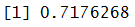
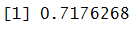
The accuracy comes out to be approximately 72%.
Tuning Hyperparameters
In this blog post, we will tune the number of neighbours i.e. k.
Grid Search
Defining Parameters. We define the values for the parameter.
params_knn <- expand.grid(k=c(5,6,7,8,9,10))
Building and Fitting Model. We now build and fit the model on the Train dataset.
control = trainControl(method ="cv",number =3,search = "grid")
knn_gridsearch <- train(ln_Price~.,data =
train_set1,method="knn",tuneGrid=params_knn,trControl=control)
Best Parameters. bestTune attribute can be used to find the best parameters.
knn_gridsearch$bestTune

Predict and Check Accuracy. The above model with the above-mentioned values of hyperparameter is used to predict the values of the dependent variable in the Test dataset and also the accuracy is calculated.
pred_KNN1<- predict(knn_gridsearch,newdata = test_set1[,-14])
error_KNN1<- Y_test1 - pred_KNN1
R2_KNN11 =1-sum(error_KNN1^2)/sum((Y_test1-mean(Y_test1))^2)
R2_KNN11
Ensemble Models
In the Theory section, under Ensemble Methods, various kinds of ensemble techniques have been explored. Here we will explore all those ensemble techniques using R.
Random Forest Regressor
Random Forest Regressor is a variant of Bagging Regressor only and more about it can be found in the blog Bagging available in the Theory Section.
Importing RandomForest Library
We have to import randomForest to run a Random Forest Regression model.
library(randomForest)
Initializing and Fitting Model
We initialize the Random Forest model and then fit it on the Train dataset.
rfr<- randomForest(ln_Price~.,data = train_set)
Predict and Check Accuracy
The above model is used to predict the values of the dependent variable in the Test dataset. We also check the model's performance.
pred_rfr <- predict(rfr,newdata =test_set[,-14])
error_rfr<- Y_test - pred_rfr
R2_rfr=1-sum(error_rfr^2)/sum((Y_test-mean(Y_test))^2)
R2_rfr
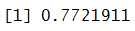
The accuracy got from this Random Forest Regression model is 77%.
Tuning Hyperparameters
Here we tune for the number of variables selected for splitting.
Grid Search
Defining Parameters. First, we define our four parameters.
sqrt = sqrt(ncol(train_set))
log2 = log2(ncol(train_set))
n_features = 13
control = trainControl(method ="cv",number =3,search = "grid")
params_RFR = expand.grid(mtry = c(sqrt,log2, n_features))
Initializing, Building and Fitting Model. In this step, we initialize and build the Random Forest Regression model using Grid Search and fit it on the Train dataset.
RF_gridsearch <- train(ln_Price~.,data =
train_set,method="rf",tuneGrid=params_RFR,trControl=control)
Best Parameters. bestTune attribute can be used to find the best parameters.
RF_gridsearch$bestTune
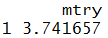
Predict and Check Accuracy. We use this model to predict the dependent variable in the test dataset and check its accuracy.
pred_rfr1 <- predict(RF_gridsearch,newdata =test_set[,-14])
error_rfr1<- Y_test - pred_rfr1
R2_rfr1=1-sum(error_rfr1^2)/sum((Y_test-mean(Y_test))^2)
R2_rfr1
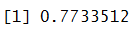
The accuracy comes out to be 77%. There is not much difference after tuning the parameter.
Gradient Boosting Regressor
Gradient Boosting Regressor is another type of a Boosting Model. Refer to the blog Boosting under Ensemble Methods in the Theory Section to know more about it.
Importing gbm Library
To create a Gradient Boost Regression model in R, we require gbm library.
library(gbm)
Initializing and Fitting Model
We initialize the model and fit it on the Train dataset.
mod_gbm_r<- gbm(ln_Price~.,data = train_set,distribution = "gaussian",n.trees
= 1000, interaction.depth = 4, shrinkage = 0.01)
Predict and Check Accuracy
The above model is used to predict the values of the dependent variable in the Test dataset and check its accuracy.
pred_gbmR<- predict(mod_gbm_r,newdata = test_set[,-14],n.trees = 1000)
error_gbmR<- Y_test - pred_gbmR
R2_gbmR=1-sum(error_gbmR^2)/sum((Y_test-mean(Y_test))^2)
R2_gbmR
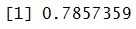
The accuracy got from this Gradient Boosting Regression model is 78%.
Tuning Hyperparameters
Here we tune 4 hyper parameters using grid search.
Grid Search
Defining Parameters. Here we define our four parameters.
params_gradb = expand.grid(n.trees=c(200,400,600,800),
interaction.depth=c(3,5,6,7),shrinkage=c(0.05,0.1,0.2),
n.minobsinnode=c(2, 3, 10))
Initializing, Building and Fitting Model. In this step, we initialize and build the Gradient Boosting Regression model using Grid Search and fit it on the Train dataset.
gradb_gridsearch <- train(ln_Price~.,data = train_set,method="gbm",
tuneGrid=params_gradb,trControl=control )
Best Parameters. We now check the best combination of parameters.
gradb_gridsearch$bestTune

Predict and Check Accuracy. We use this model to predict the dependent variable in the test dataset and check its accuracy.
pred_gbm1 <- predict(gradb_gridsearch,newdata =test_set[,-14])
error_gbm1<- Y_test - pred_gbm1
R2_gbm1=1-sum(error_gbm1^2)/sum((Y_test-mean(Y_test))^2)
R2_gbm1
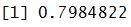
The accuracy comes out to be approximately 80%.
XgBoost Regressor
XgBoost stands for Extreme Gradient Boost which is an advanced version of Gradient Boost.
Installing and Importing Library
We first install xgboost library and then load it.
install.packages("xgboost")
library(xgboost)
Initializing and Fitting Model
We initialize the model and fit it on the Train dataset.
x <- as.matrix(train_set[,-14])
y <- train_set$ln_Price
x1 <- as.matrix(test_set[,-14])
mod_xgbR <- xgboost(data = x,label = y,nrounds = 100,objective ="reg:squarederror")
Prediction and Accuracy
The above model is used to predict the values of the dependent variable in the Test dataset. We also check the model's performance on the Training dataset.
pred_xgbR<- predict(mod_xgbR,newdata = x1)
error_xgbR<- Y_test - pred_xgbR
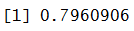
R2_xgbR=1-sum(error_xgbR^2)/sum((Y_test-mean(Y_test))^2)
R2_xgbR
Stacking Regressor
Stacking is a method where we use multiple learning algorithms and get a result by combining the results of all these separate algorithms. In this blog, we will perform a Level-One stacking. To know more about it refer to the blog - Stacking under the Theory section.
Import Library
We import caretEnsemble which will allow us to create a stacked regression model.
library(caretEnsemble)
Define Algorithms
We then define the algorithm list for Stacking.
algorithmList <- c('rf', 'glmnet', 'knn') Initiate and Fit Model
In this step we initiate and fit the above-mentioned algorithms using caretList function on the dataset.
algorithmList <- c('rf', 'glmnet', 'knn')
models <- caretList(ln_Price~., data=train_set1,
trControl=control,methodList=algorithmList)
Stacking Models
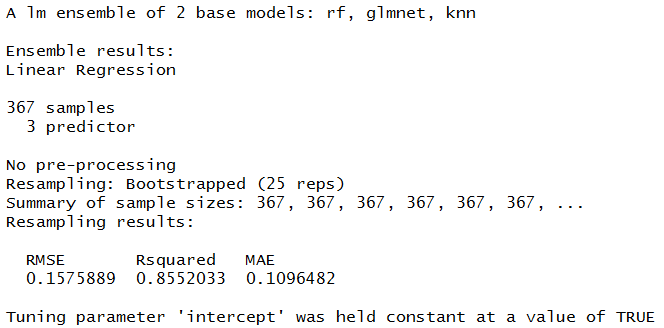
Stacking all the models through meta-layer of Linear Regression.
stack_lm <- caretStack(models, method="lm")
stack_lm
Predicting and Checking Accuracy
We now predict the dependent variable in the Test dataset and on the basis of these predictions check for the accuracy of this stacked model.
pred_stack <- predict(stack_lm,test_set1[1:13])
error_stack <- Y_test1 - pred_stack
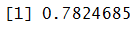
R2_stack=1-sum(error_stack^2)/sum((Y_test1-mean(Y_test1))^2)
R2_stack
In this blog, we explored the various regression algorithms that were explored in the Theory section of Modeling. All such algorithms have been put to use using Python in the blog - Regression Problems in Python.