 TM
TM// application · r
Feature Engineering in R
Various concepts of Feature Engineering have been explored in the Theory section. In this blog, we will discuss how to apply those concepts to datasets using R. The following topics will be covered in this blog:
- Feature Transformation
- Feature Scaling
- Feature Construction
- Feature Reduction
Feature Transformation
Import Dataset: A Dataset having a numerical variable 'Sales_in_thousands'.
CarData <- read.csv("C:/Users/user/Desktop/Data Sets/car_sales.csv")Plot Bar Graph: By plotting a histogram we can check the skewness of the data.
hist(CarData$Sales_in_thousands,col = 'blue')
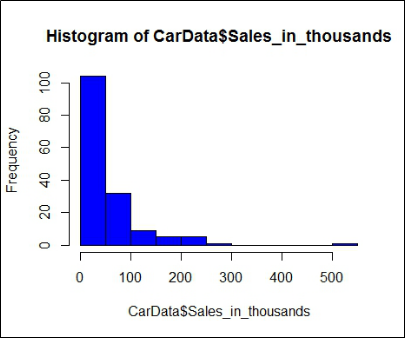
It is evident how skewed the data is. We now can apply various transformations and see how it affects the skewness of the data.
Calculate Skewness: We also calculate the skewness to give us an exact idea of how much the data is skewed.
skewness(CarData$Sales_in_thousands,type = 2)
We find that the skewness comes out to be 3.408518, which indicates that the data is heavily positively (right) skewed and is far away from 0 (normal).
Log Transformation
Among the most commonly used methods of transformation, Log Transformation takes the natural logarithm of the variable, which helps in making the distribution normal. Here we perform Log Transformation on the variable 'Sales_in_thousands' to reduce skewness and normalize the data.
CarData$ln_Sales_in_thousands <- log(CarData$Sales_in_thousands)
We now create a histogram on this log-transformed variable and see how it has changed from the earlier histogram created on the untransformed variable.
hist(CarData$ln_Sales_in_thousands,col = 'blue')
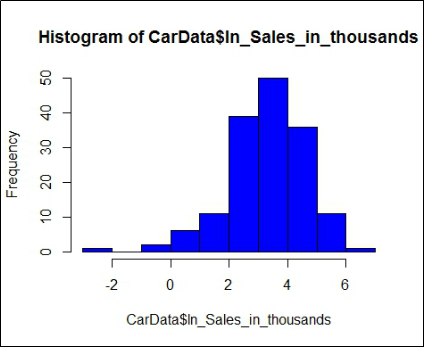
The distribution certainly now appears to be much more normal. Thus, the skewness of the distribution can be curbed by the use of log transformation.
We can use the skewness() command to find the exact value of skewness.
skewness(CarData$ln_Sales_in_thousands,type = 2)
The transformation causes the distribution to become slightly negatively (left) skewed; however, the output (variable's distribution) is much closer to 0 than what it was when the variable wasn't transformed.
Square-Root Transformation
Another popular method of transformation is Square-Root transformation, which helps in normalizing the data.
CarData$sqt_Sales_in_thousands <- sqrt(CarData$Sales_in_thousands)
Just like before, we create a histogram to check the distribution of this square-root-transformed variable.
hist(CarData$sqt_Sales_in_thousands,col = 'orange')
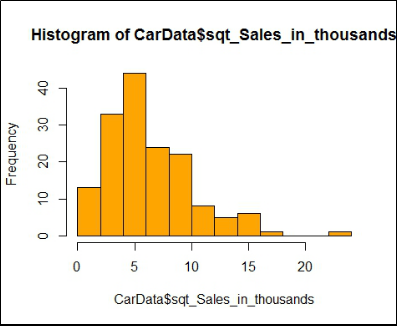
We see that it has affected the distribution of the data, but it is nowhere close to the normality provided by log-transformation. To get a more precise idea, we calculate the skewness of this transformed variable.
skewness(CarData$sqt_Sales_in_thousands,type = 2)
The value comes out to be 1.270035, which means that the Square-Root Transformation makes the data positively skewed and performs worse than Log-Transformation.
Cube-Root Transformation
Apart from Log and Square-Root transformation, Cube-Root transformation can also be tried.
CarData$cbt_Sales_in_thousands <- (CarData$Sales_in_thousands)^(1/3)
A histogram is created to visually understand the distribution.
hist(CarData$cbt_Sales_in_thousands,col = 'dark green')
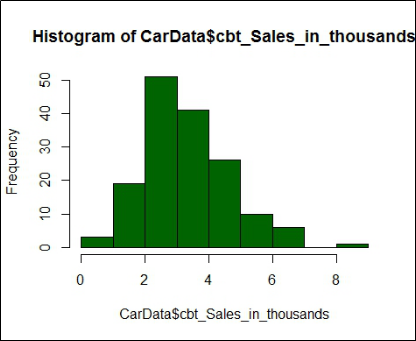
We see that Cube-Root fares better than Square-Root but worse than Log-Transformation. Skewness is calculated for the above cube-root-transformed variable.
skewness(CarData$cbt_Sales_in_thousands,type = 2)
The value comes out to be 0.6499001, which indicates that the distribution, just like after square-root transformation, is positively skewed but is much closer to 0, and hence is more towards the normal distribution.
Feature Scaling
Feature scaling is conducted to standardize the independent features. This is done because the range of raw data may vary widely. Some predictive models such as KNN and K-means consider Euclidean distance, and it is important for them to have the features on the same scale. There are mainly two ways of performing scaling on features:
- Min-Max Scaler
- Z-Scores (Standardization)
Import Dataset: We consider a hypothetical dataset having Income and Age of people.
IncAgeData = read_excel("C:/Users/user/Desktop/DataSets/IncomeAgeData.xls")
View(IncAgeData)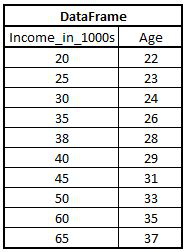
Min-Max Scaler
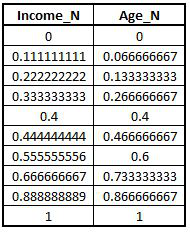
MinMaxScaler is one of the methods of standardizing the data, where values are made to lie between 0 and 1.
I <- IncAgeData$Income_in_1000s
A <- IncAgeData$Age
Unlike Python, R does not have a built-in function for Min-Max Scaler. Therefore, we will have to calculate it manually.
Income_N = (I-min(I))/(max(I)-min(I))
Age_N = (A-min(A))/(max(A)-min(A))
MinMaxScaler <- cbind.data.frame(Income_N,Age_N)
View(MinMaxScaler)
Z-Score (Standardization)
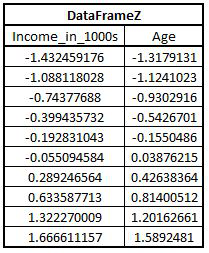
Standardization is another way of scaling a dataset. It has been explored at length under Z-Scores, Z-Test and Probability Distribution. Here we use the same dataset which we have used above.
DataFrame <- data.frame(I,A)
DataFrameZ <- as.data.frame(scale(DataFrame))
Feature Construction
Feature Construction is a process of creating features based on the original descriptors. This helps in building more efficient features for building predictive models. There are two main methods of Feature Construction: Binning and Encoding.
Binning
This method is used to create bins for continuous variables, where continuous variables are converted to categorical variables. There are two types of binning: one is supervised and the other is unsupervised.
Unsupervised Binning
Under unsupervised binning, there are mainly two types of binning: Automatic and Manual.
Automatic Binning
In this unsupervised method of binning, the bins are created automatically, and we do not explicitly mention how the bins are to be created.
Import Dataset: We use a hypothetical dataset having the Height of 20 individuals.
HeightData = read_excel("C:/Users/user/Desktop/Data Sets/Height_Data1.xls")
View(HeightData)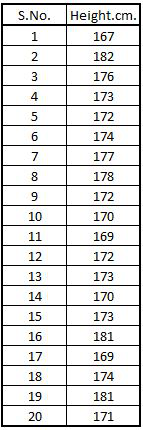
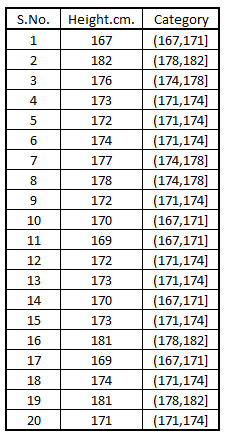
Performing Automatic Binning: We simply use the cut command and specify the dataset and the number of bins to be created.
HeightData$Category <- cut(HeightData$Height.cm.,breaks = 4)
Manual Binning
In this type of unsupervised binning, we specify in the code where the bins are to be created.
Performing Manual Binning: We use the cut command to perform manual binning.
HeightData$HeightCat <- cut(HeightData$Height.cm.,breaks = c(165,170,175,180,185),labels = c("165-170","170-175","175-180","180-185"))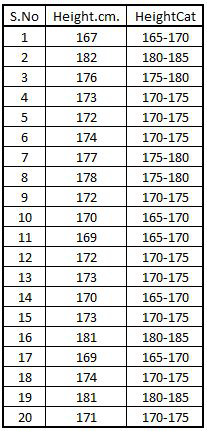
Supervised Binning
In Supervised Binning, the target variable, i.e. the class variable, is also taken into consideration while making bins for the continuous variable. In R, we will use a function called woe.binning, which will perform supervised binning.
Import Dataset: To demonstrate supervised binning, we will take a dataset with one categorical and one continuous variable.
df1 <- read.csv("C:/Users/user/Desktop/Data Sets/GenderAge.csv")
View(df1)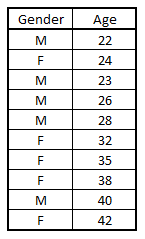
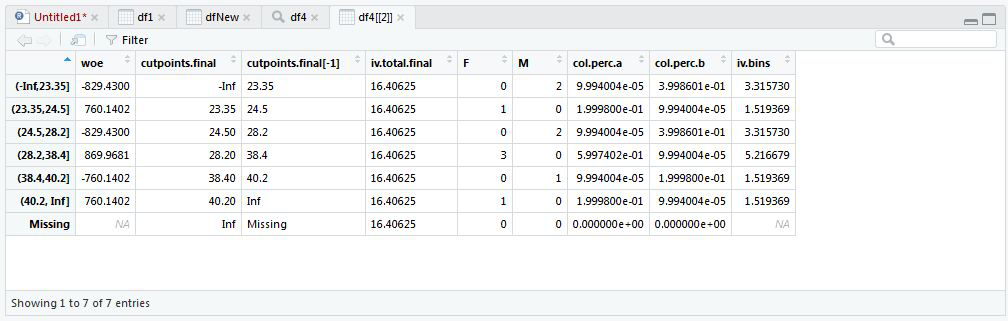
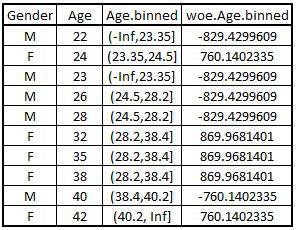
Performing Supervised Binning: We now perform Supervised Binning on the above dataset.
df4 <- woe.binning(df1,'Gender','Age')
View(df4)
Converting Output: Next, we put the above output in a dataset for our ease.
dfNew <- woe.binning.deploy(df1,df4,add.woe.or.dum.var = "woe")
View(dfNew)
Encoding
Encoding is a process of creating numerical variables from categorical variables. This is done in order to make the categorical features available for analysis, as most of the learning algorithms require numerical features for their functioning.
Importing Libraries: First, we install packages for dummy variables and load the package in our R directory.
install.packages("dummies")
library(dummies)dummies package has been archived on CRAN. The fastDummies approach shown below is the current equivalent of dummy().Creating Dataset: We create an arbitrary dataset having Age and Gender of 10 individuals.
a <- c("M","F","F","M","M","M","F","M","F","F")
b <- c(22,23,24,26,28,30,27,32,35,37)
encode <- data.frame(a,b)
View(encode)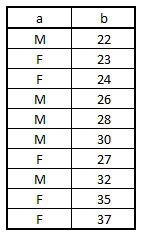
Dummy Variables
We use the dummy function, which is one of the available functions to perform encoding.
DataNew1 <- cbind(encode,dummy(encode$a,sep = "_"))
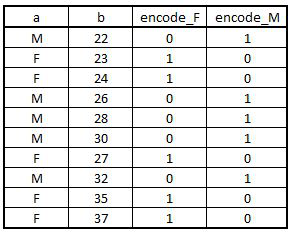
Using remove_first_dummy: Most of the time, if we have x number of categories in a categorical variable, then we want x-1 number of dummy variables. To do so we use the remove_first_dummy command.
Importing Dataset: We consider an arbitrary dataset having two categorical variables, with each having two levels.
SmokingData2 = read_excel('C:/Users/user/Desktop/Data Sets/SmokingData2.xls')
View(SmokingData2)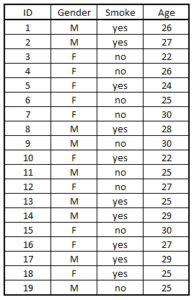
Upload Libraries: We will first install and load the package fastDummies to create n-1 dummy variables.
install.packages("fastDummies")
library(fastDummies)
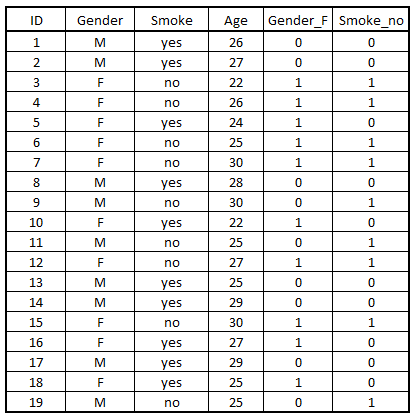
Generating Dummy Variables: The following code will generate dummy variables for all character/factor variables in the dataset.
Encode_Dummy = dummy_cols(SmokingData2,remove_first_dummy = T)
View(Encode_Dummy)
One-Hot Encoding
One-Hot Encoding is another method of encoding.
Importing and Initializing Libraries: We start by importing the onehot library.
library(onehot)
onehot package has been archived on CRAN. Current alternatives include mltools::one_hot() or caret::dummyVars().Importing Dataset: To demonstrate one-hot encoding in R, we will take the above SmokingData2 dataset. However, first, we will have to convert the categorical variables Gender and Smoke to factors.
SmokingData2$Gender = as.factor(SmokingData2$Gender)
SmokingData2$Smoke = as.factor(SmokingData2$Smoke)
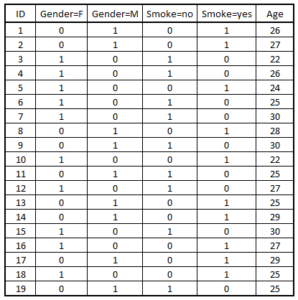
Performing One-Hot Encoding: Now we will apply one-hot encoding on our dataset.
onehot_encode = onehot(SmokingData2)
onehot_encode

Generating the output.
Output <- predict(onehot_encode,SmokingData2)
View(Output)
Feature Reduction
There are various methods of reducing the number of features, and in this blog, the methods that are explored are as follows:
- Feature Selection
- Feature Extraction
- Factor Analysis
There are many ways through which each of the above-mentioned methods of feature reduction can be performed, and they will be put to use on various datasets using R.
Feature Selection
As discussed in the Theory of Feature Selection, there are mainly three ways to do feature selection: Filter Methods, Wrapper Methods and Embedded Methods.
Filter Methods
There are multiple ways to do feature reduction by using Filter Methods. The most popular ones are ANOVA, Pearson Correlation, and Chi-Square. All these methods have been discussed in the Application of Inferential Statistics in R.
Maximal Information Coefficient
Maximal Information Coefficient is also one of the Filter Methods. In this method we select the features based on their maximal information coefficient value. To demonstrate this method we will be using car sales data.
We first import a dataset. Here we import a car sales dataset.
CarSalesData <- read.csv("C:/Users/user/Desktop/R - Basic Stats/Data Sets/car_sales.csv")We now install and load packages required for MIC.
install.packages("minerva")
library(minerva)
We then remove categorical variables, as MIC is performed only on numeric variables; therefore we will remove the categorical variables from our dataset.
x <- CarSalesData[,-c(1,2,5)]
Now we will remove variables having low variance.
excl <- which(var(x) < 1e-5)
x <- x[,-excl]
Defining our Y variable, i.e. the dependent variable.
y <- CarSalesData$Sales_in_1000S
Now we will calculate the MIC value and rank using the independent and dependent variables.
M <- mine(x,y=y,alpha = 0.7)
res <- data.frame(MIC = c(M$MIC))
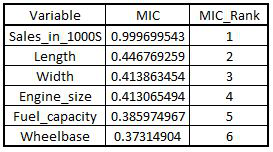
M$MIC is used to extract the MIC value of the result. We use rank in the following code to get the MIC rank as per the MIC values.
res$MIC_Rank <- nrow(res) - rank(res$MIC,ties.method = "first") +1
View(res)
res <- res[order(res$MIC_Rank),]
Wrapper Methods
It is important to note that Wrapper Methods are in a way part of modeling only and should be discussed under the respective section; however, as they can be used as a feature reduction technique, we will be exploring them here only.
In Wrapper Method, the selection of features is done while running the model. You can perform stepwise/backward/forward selection or recursive feature elimination.
Import Boston Dataset: Here we will use the Boston dataset, which is available in R. The inbuilt datasets in R are present in the MASS library. Therefore we first download the dataset and then proceed with the preprocessing.
library(MASS)
BosData = Boston
Necessary Preprocessing: We first perform some preprocessing on the dataset before it can be used for performing RFE. Renaming the column name medv as Price.
library(dplyr)
BosData1 = rename(BosData,'Price'='medv')
View(BosData1)
head(BosData1)

We now perform some more preprocessing, such as taking the log of the dependent variable and splitting the data into train and test.
BosData1$ln_Price = log(BosData1$Price)
BosData2 = BosData1[,-c(14)]
set.seed(123)
library(caTools)
split <- sample.split(BosData2$ln_Price,SplitRatio = 0.70)
train_set<- subset(BosData2,split==T)
test_set<- subset(BosData2,split==F)
X_train = train_set[1:13]
Y_train = train_set[14]
X1_train <- data.matrix(X_train)
Y1_train <- data.matrix(Y_train)
(The loading of this dataset in R has been explained in the modeling section (application).)
Recursive Feature Elimination
In the next few steps, we will reduce the number of features using the RFE method. Loading the library caret to perform regularized regression.
library(caret)
Here we set the seed equal to 0 to perform modeling without cross-validation.
set.seed(0)
We now initialize Recursive Feature Elimination.
results_lr <- rfe(X1_train,Y1_train,size=c(1:13),
                   rfeControl=rfeControl(functions = lmFuncs))
results_lr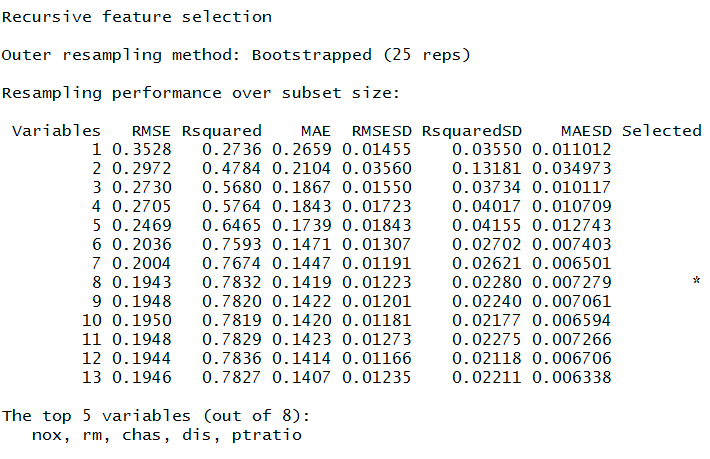
We can select the number of variables we require by specifying the size parameter in the following command.
UpdatedLR1 <- update(results_lr,X1_train,Y1_train,size = 8)
UpdatedLR1[["bestVar"]]

Stepwise/Forward/Backward Selection
First, we will create upper and lower bounds for Forward Selection and Backward Selection. The upper bound will be the model containing all features, while the lower bound will be the model with no variables.
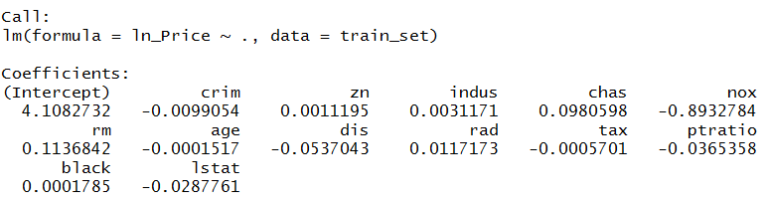
We start with creating the upper bound, i.e. the model with all features.
modelF <- lm(ln_Price~.,data=train_set)
modelF
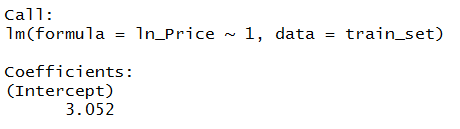
We can also create the lower bound, i.e. the model with no features.
modelnull <- lm(ln_Price~1,data=train_set)
modelnull
Performing Forward Selection: Here we use the function step and specify forward selection in the direction parameter.
modelforward <- step(modelnull,scope = list(lower=modelnull,upper=modelF),direction = "forward")
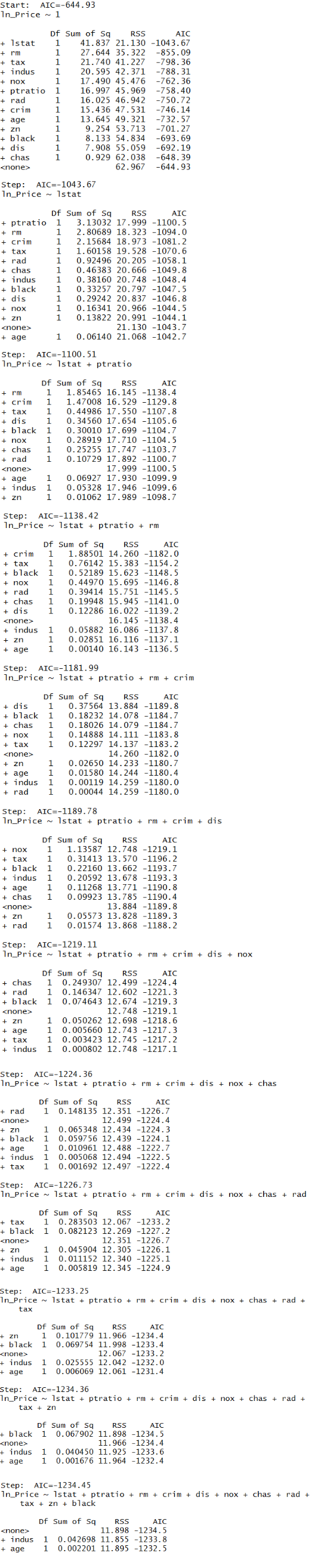
R searches through models between the null and full models using forward selection; scope is the range of the models examined. Direction = 'forward' tells the program to perform forward selection.
Performing Backward Selection: Here also we use the function step, but this time specify backward selection in the direction parameter.
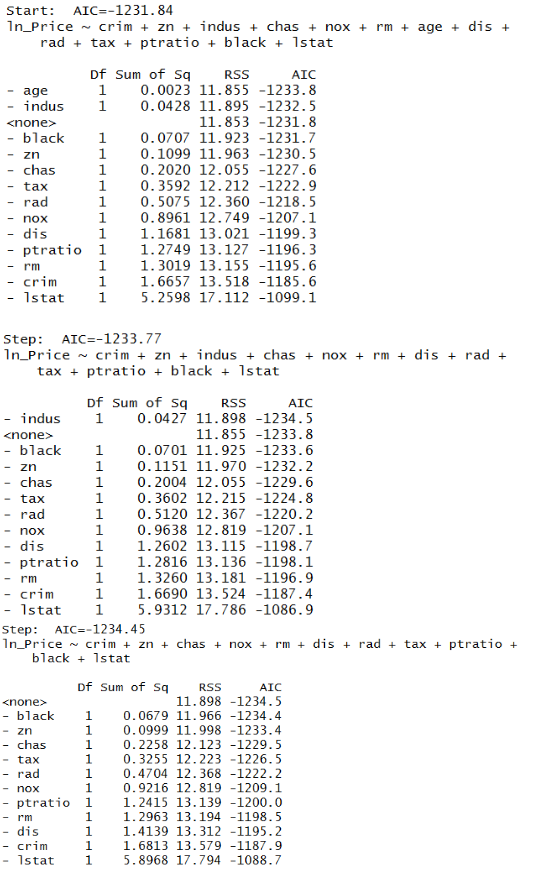
Performing Stepwise Selection: Here we now use the stepwise method, which is a combination of both forward and backward selection.
stepwise <- step(modelnull, scope = list(upper=modelF), data=train_set, direction="both")

Embedded Methods
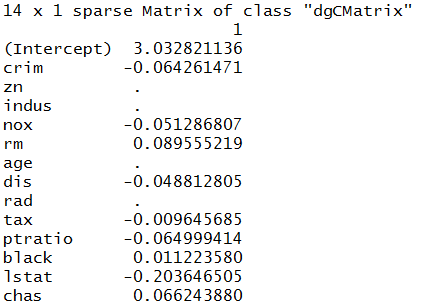
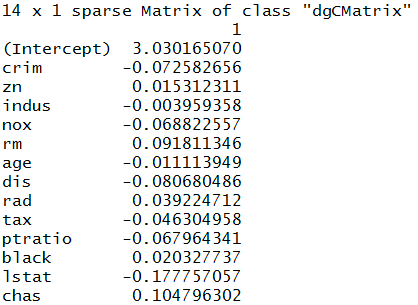
Embedded Methods use regularization algorithms to improve the accuracy of the models. Again, just like wrapper methods, this technique is used while building models and is in a way part of modeling only and should be discussed under the modeling section, but it is being explored under the Data Preparation section as we are using it for feature reduction. Embedded methods tell us about the best features that can be selected as per their importance, which is deduced from the value of their coefficients. To show an example, we will use Regularized Linear Regression. Here we have taken the same Boston dataset as above and performed Regularized Linear Regression on the train dataset. There are two types of Regularization: Lasso and Ridge. The value of alpha can be changed as per your requirement. Alpha is equal to 0 for Ridge and 1 for Lasso. The coefficients that we get from running the model are the deciding factors for feature selection. (Note that alpha in Python is equivalent to lambda in R. In R, alpha defines whether to perform Lasso or Ridge regression.)
Splitting the dataset for Regularization: To perform Ridge and Lasso regression, we split the dataset into a separate train/test pair for this section.
train_set1 <- train_set
test_set1 <- test_set
Loading library caret to run Lasso and Ridge regression models.
library(caret)
LASSO
Initializing the Lasso Regression model.
lasso_reg = train(ln_Price~.,data=train_set1,
                   method='glmnet',trControl = trainControl(method="none"),
                   tuneGrid=expand.grid(alpha=1,lambda=0.01))
Predicting values using the predict function.
pred_lasso = predict(lasso_reg,newdata = subset(test_set1,select = c(1:13)))
Separating the dependent variable from the test dataset.
Y_test<- test_set1$ln_Price
Computing R-Square.
error <- Y_test - pred_lasso
mse <- mean(error^2)
R2=1-sum(error^2)/sum((Y_test- mean(Y_test))^2)
R2
Coefficients of Lasso Regression.
coef(lasso_reg$finalModel, s = lasso_reg$bestTune$lambda)
RIDGE
Initializing the Ridge Regression model.
Ridge_reg = train(ln_Price~.,data=train_set1,
                   method='glmnet',trControl = trainControl(method="none"),
                   tuneGrid=expand.grid(alpha=0,lambda=0.01))
Predicting values using the predict function.
pred_ridge = predict(Ridge_reg,newdata = subset(test_set1,select = c(1:13)))
Separating the dependent variable from the test dataset.
Y_test<- test_set1$ln_Price
Computing R-Square.
error <- Y_test - pred_ridge
mse <- mean(error^2)
R2=1-sum(error^2)/sum((Y_test- mean(Y_test))^2)
R2
Coefficients of Ridge Regression.
coef(Ridge_reg$finalModel, s = Ridge_reg$bestTune$lambda)
Feature Extraction
There are many methods for performing Feature Extraction, such as Principal Component Analysis (also known as PCA, which is an unsupervised learning algorithm), Kernel PCA, Linear Discriminant Analysis (LDA), Independent Component Analysis, etc. In this blog post, the focus will be only on PCA.
Principal Component Analysis
Here we will explore the most important method of Feature Extraction, which is Principal Component Analysis, and will use this method to reduce the features and use the output in modeling.
Importing Dataset: Here we will be using the Boston Dataset. We will import a preprocessed dataset. This dataset has also been used in the Regression Problems using R, where the preparation of this dataset has also been explored.
library(readxl)
BosData = read_excel('C:/Users/user/Desktop/R - Basic Stats/BosData.xls')
Removing Response Variable: As PCA works in an unsupervised learning setup, we will remove the dependent, i.e. response, variable from our dataset. Note that PCA only works on numeric variables, and that is why we create dummy variables for categorical variables. As here we have only one categorical variable, 'Chas', which is a binary categorical variable, we don't require creating a dummy variable and can use all the independent variables for performing PCA.
BosData <- BosData[2:15]
Splitting the Dataset into Train and Test
It is important to note at this point that PCA should not be made to run on the entire dataset, as this would cause the dataset to leak, causing overfitting. Also, we should not perform PCA on train and test separately, as the level of variance will be different in both these datasets, which will cause the final vectors of these two datasets to have different directions. This is a Catch-22 situation, and to get out of it we first divide the dataset into train and test and perform PCA on the train dataset and transform the test dataset using that PCA model (that was fitted on the train dataset). Below we use R's sample.split function (from the caTools package) to split the data into train and test.
set.seed(123)
split <- sample.split(BosData$ln_Price,SplitRatio = 0.70)
train_set<- subset(BosData,split==T)
test_set<- subset(BosData,split==F)
Initialize and Fit PCA
We first initialize PCA for having 13 components (for 13 continuous variables in the dataset), and we fit this model.
pca_train <- train_set[1:13]
pca = prcomp(pca_train,scale. = T)
Generate PCA Loadings
We use the x attribute of the PCA model to obtain PCA loadings for each observation.
loadings <- as.data.frame(pca$x)
Generate Loading Matrix
We now generate the principal components loading matrix by using the attribute rotation of the PCA command for each variable. This loading matrix is like a correlation matrix. The variable having the highest correlation with the columns will be the first principal component. For example, the variable indus has the highest correlation with PC1; therefore, indus will be PC1. (The heading in the output is PC1, PC2 and so on. We will be renaming them in the upcoming steps.)
Matrix <- pca$rotation
Variance Explained by Each Principal Component
As we saw above, we took the number of components for PCA equal to the number of variables in our dataset (which is 13 in our case). However, now with the following code, we will figure out the optimum value of the number of components to run PCA, i.e. reduce the number of components to be considered for the modeling algorithms and thus, in a way, reducing the number of features. In order to decide the number of Principal Components, we analyze the proportion of variance explained by each component. We use the sdev attribute of PCA to compute the standard deviation and use it to calculate the variance explained by each Principal Component.
std_dev <- pca$sdev
pr_comp_var <- std_dev^2
pr_comp_var

Ratio of Variance Explained by Each Component
We can now look at the proportion of variance explained by each PC.
prop_var_ex <- pr_comp_var/sum(pr_comp_var)
prop_var_ex

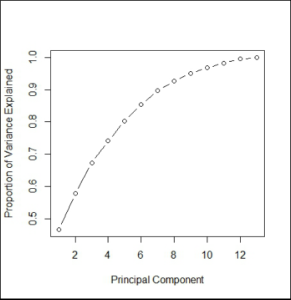
From the output we find that PC1 explains 47% of the variance, PC2 explains 11%, and so on. We find that the first seven components explain approximately 90% of the variance (0.466070438 + 0.111774888 + 0.095063892 + 0.068295781 + 0.062033630 + 0.051121000 + 0.043612510 = 0.897972139).
PCA Chart
In the above step, we got the proportion of variance explained by each component, which we need to decide the number of components. We calculated that the first seven components explain most of the variance; however, for a more visual approach, we plot the explained variance on a line graph. Here we plot the ratio of variance explained by each component using a line graph. This PCA chart helps us decide the number of principal components to be taken for the modeling algorithm.
plot(cumsum(prop_var_ex), xlab = "Principal Component",ylab = "Proportion of Variance Explained",type = "b")
Concatenate Dependent Variable and Principal Components
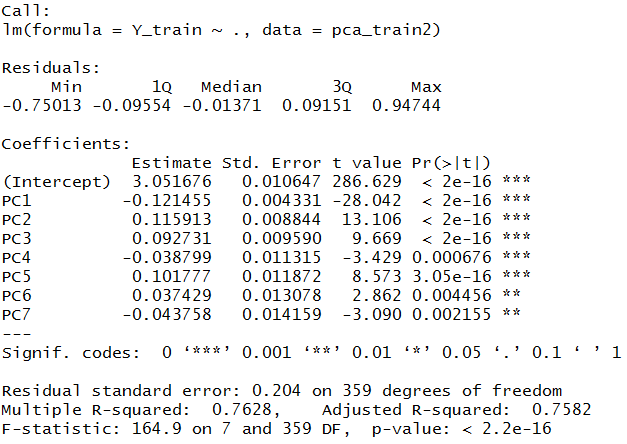
We now concatenate the dependent variable, i.e. ln_Price, with the principal components and take the first seven components for our analysis. First, we will concatenate the entire loadings dataset with the response, aka the y variable ln_Price, and then subset the dataset for 7 PCs.
pca_train2 <- cbind(loadings,Y_train)
View(pca_train2)
Creating Dataset having Principal Components
Above, the output forms the complete train dataset. As now we will be performing linear regression on this dataset, we are required to create a separate dataset having all the principal components, i.e. the independent features.
loadings2 <- loadings[1:7]
pca_train2 <- cbind(loadings2,Y_train)
Initializing and Fitting Linear Regression Model
We use lm to initialize the linear regression model.
lin_model <- lm(Y_train~.,data=pca_train2)
summary(lin_model)
Transform Features of Test Dataset into Principal Components
As mentioned earlier, we will transform the features of the dataset into Principal Components using the PCA model created earlier.
pca_test <- test_set[1:13]
pca_test2 <- predict(pca, newdata = pca_test)
We now convert the above output into a dataset and add the dependent variable to it so that we can predict values using the above-created linear regression.
pca_test2 <- as.data.frame(pca_test2)
View(pca_test2)
pca_test3 <- pca_test2[1:7]
Y_test <- test_set$ln_Price
pca_test4 <- cbind(pca_test3,Y_test)
Prediction
We now predict the dependent variable of the test dataset using the linear regression model created earlier.
predict1 <- predict(lin_model,pca_test3)
Results
We calculate the R-Square to know the accuracy of our model.
error <- Y_test - predict1
mse <- mean(error^2)
R2=1-sum(error^2)/sum((Y_test- mean(Y_test))^2)
R2
Factor Analysis
Factor Analysis is a method which works in an unsupervised setup and forms groups of features by computing the relationship between the features. It is commonly used to reduce features and is explored in Factor Analysis under the Theory section. We will now explore the application of Factor Analysis in R.
Factor analysis can only be used to reduce continuous variables of the dataset. Therefore, we will be removing categorical variables. Again, like Principal Component Analysis, this is an unsupervised learning algorithm, and hence we will be removing the dependent variable from our dataset.
Removing the Dependent and Categorical Variables: As mentioned above, factor analysis works in an unsupervised setup only for the numerical variables; therefore, we will get rid of the categorical and the dependent variable. We continue using the same preprocessed Boston dataset (BosData2) created earlier in the Wrapper Methods section.
Bos_train2 <- BosData2
Factor1 = subset(Bos_train2,select = c(1,2,3,5,6,7,8,9,10,11,12,13))
Creating Correlation Matrix for the above Dataset
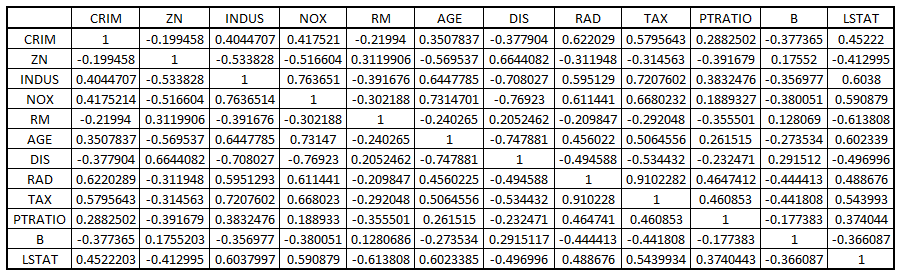
To perform factor analysis we first create a correlation matrix using the above dataset. We can also manually analyse this matrix, as this will give us an idea of the variables that are highly correlated with each other.
corrm<- cor(Factor1)
Finding Eigen Values
We will now find the eigenvalues to decide the number of factors that will be sufficient for our modeling, i.e. deciding the number of variables we will use during modeling.
eigen(corrm)$values

Coming up with other useful values, such as cumulative eigenvalue, percentage variance and cumulative percentage variance.
eigen_values <- mutate(data.frame(eigen(corrm)$values)
                        ,cum_sum_eigen=cumsum(eigen.corrm..values)
                        ,pct_var=eigen.corrm..values/sum(eigen.corrm..values)
                        , cum_pct_var=cum_sum_eigen/sum(eigen.corrm..values))
write.csv(eigen_values,"C:/Users/user/Desktop/Data Sets/factor1.2.csv")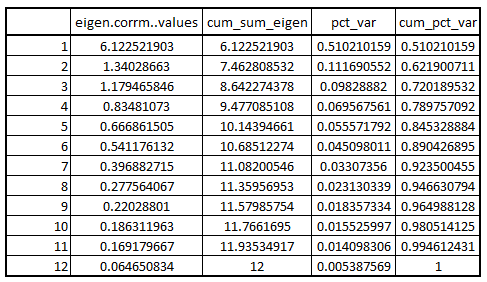
Clearly, the four factors explain approximately 79% of the variance. Therefore, the number of factors will be equal to 4 in our case.
Reducing Variable using Factor Analysis
Using FA to perform factor analysis.
require(psych)
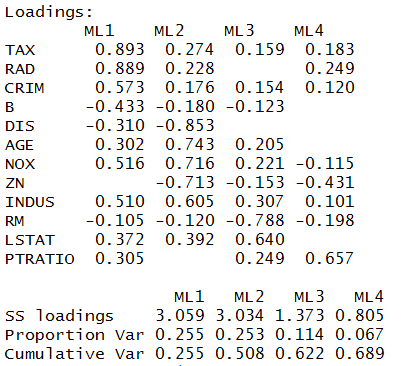
FA<-fa(r=corrm, 4, rotate="varimax", fm="ml")
FA_SORT<-fa.sort(FA)
FA_SORT$loadings
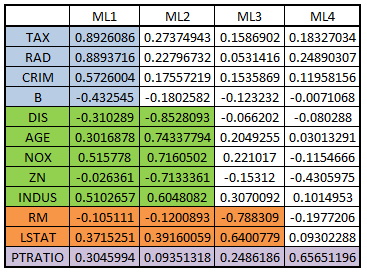
Grouping variables.
load1 = FA_SORT$loadings
write.csv(load1,"C:/Users/user/Desktop/Data Sets/factor1.3.csv")
In this blog post, we explored the application of the concepts mentioned in the Theory Section of Feature Engineering. Feature Engineering plays a crucial role in determining how well the learning algorithms will perform. It is important to Transform, Scale, Reduce and Construct features if it helps in increasing the quality of the data and makes the features more compatible with the various modeling algorithms. In the next section of application, all the concepts mentioned under the Theory Section of Modeling will be put to use using R.